

Front Desk Report
Arrivals and departures over a range of days, with what became of each booking — the morning hand-over sheet, printable and exportable.
The front desk report (/front-desk/report) is the sheet a supervisor prints for the morning hand-over and reads back after the fact. For every day in a range it lists everyone who was expected to arrive and everyone who was expected to leave, with what actually became of them: who turned up, who did not, who checked out at 06:40, and who left owing money. Reach it from the Report button in the header of Arrivals & Departures.
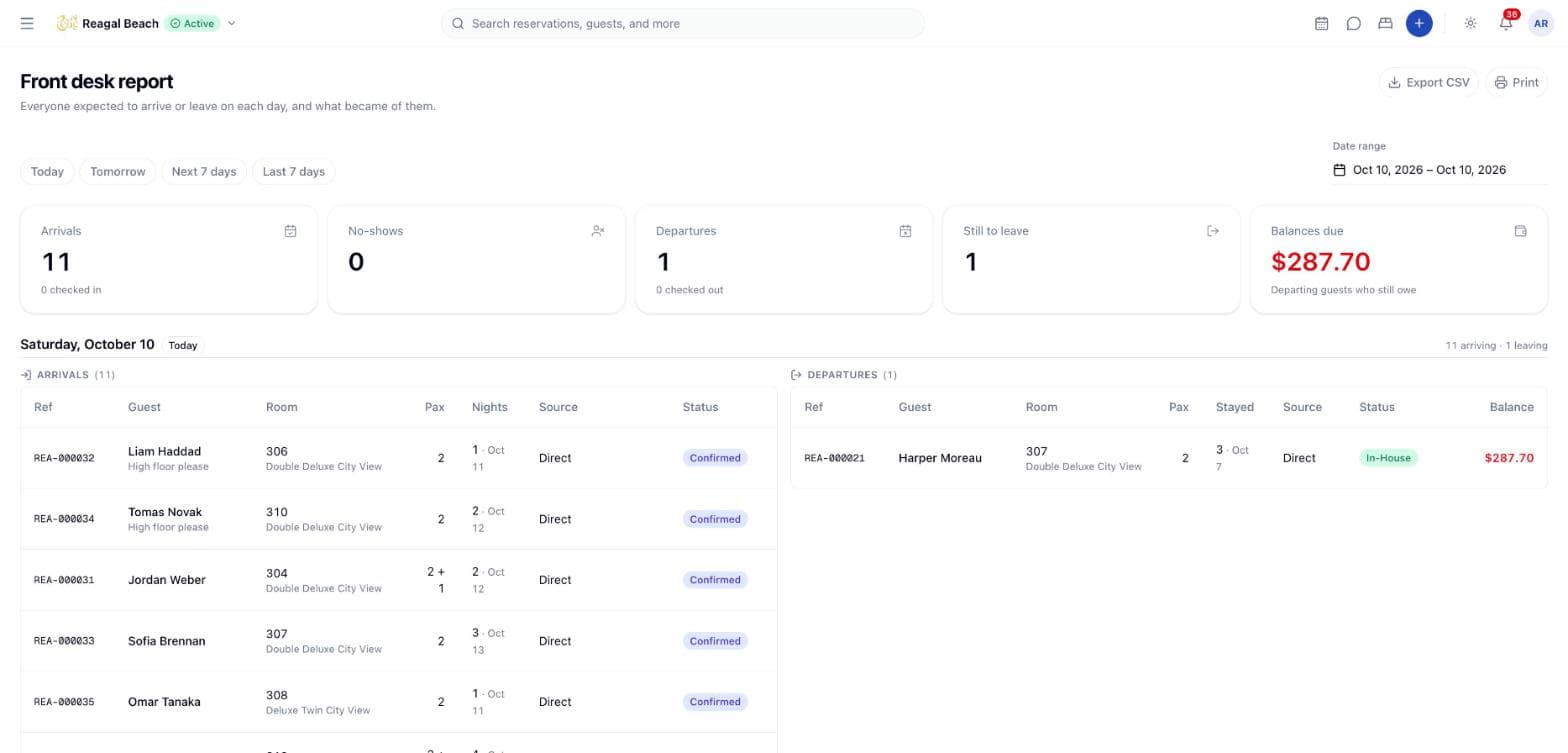
The difference from the board matters. The board is a work queue — a row disappears the moment you finish it — so it can never answer what happened yesterday. The report is a record: it keeps the no-shows, the guests already checked in and the ones already gone. Run it for a single day and it is the printable form of the board; run it for a week and it is the week's traffic.
Pick the range
Four quick picks sit above the report, and the one matching the current range is highlighted:
| Pick | Range |
|---|---|
| Today | The property's today, one day |
| Tomorrow | The next day, alone |
| Next 7 days | Today plus the following six |
| Last 7 days | The six days before today, up to and including today |
Beside them, the Date range picker takes any start and end. Both ends are inclusive, "today" is the property's today, and the report opens on Today.
At most 92 days
A quarter is the limit — long enough for a month-end review, short enough to print. Ask for more and the server answers The report covers at most 92 days; put the dates the wrong way round and it answers to must not be before from. For a longer window, use the exports under Accounting → Reports.
The tiles
Five tiles summarise the whole range.
| Tile | Counts |
|---|---|
| Arrivals | Every booking that was expected to arrive in the range, with N checked in underneath |
| No-shows | Those arrivals that ended as No Show. Amber when there are any |
| Departures | Every stay that was due to leave in the range, with N checked out underneath |
| Still to leave | Departures minus those already checked out |
| Balances due | The total still owed by departing guests, over Departing guests who still owe. Green at zero, red above it |
Balances due adds up only the guests who owe; a guest who has overpaid does not quietly offset someone else's debt.
What counts as an arrival
| List | Statuses included |
|---|---|
| Arrivals | On Hold, Confirmed, In-House, Checked Out, No Show |
| Departures | In-House, Checked Out |
Cancelled bookings are not arrivals — they were withdrawn before the day. A no-show was expected and did not turn up, which is exactly what the report exists to show, and a hold still open on the day was expected too. On the departures side, only a guest who actually stayed can leave: one who never checked in is not departing, and one already checked out is kept because the report is a record.
Arrivals are ordered the way a desk works them — by the expected arrival hour where the channel supplied one, with unknown hours last, since an unknown arrival time is not an early one.
One section per day
Each day gets a heading (Thursday, October 8), a Today badge where it applies, and a count on the right reading N arriving · M leaving. Under it, Arrivals and Departures side by side, each with its own row count; an empty side reads None.
Every day in the range is present, quiet days included — a printed hand-over sheet with a day missing reads as a mistake rather than as a quiet day. A day with nothing at all says Nothing arriving or leaving.
Columns
| Column | Content |
|---|---|
| Ref | The booking reference, linking to the reservation |
| Guest | The guest's name, with any special requests on a second line |
| Room | The assigned room number, with the room type underneath; — when no room is assigned |
| Pax | Adults, or adults + children where there are children |
| Nights / Stayed | The number of nights, then the other end of the stay — the departure date on an arrival row, the arrival date on a departure row |
| Source | The company or agent where the booking has one, Walk-in for a walk-in, Direct for a booking taken in the PMS, otherwise the channel's name |
| Status | The reservation's status badge, with the time it was checked in or out beneath it, on the property's clock |
| Balance | Departures only: the live folio balance. Red when the guest owes, green when they have overpaid |
A one-night stay inside the range appears twice — once as that day's arrival and once as the next day's departure — because it is both.
Print and export
Print opens the browser's print dialog with the screen's controls hidden and a header added: the property's name, Arrivals & departures, the range, and printed <date and time> on the property's clock. Day sections are kept whole across page breaks.
Export CSV opens a column picker — tick the columns you want, or use All / None — and downloads front-desk-<from>_<to>.csv. The columns are Date, Type, Reference, Guest, Room, Room type, Adults, Children, Check-in, Check-out, Nights, Source, Status, Checked in at, Checked out at, Total, Balance, Currency and Requests. The file holds the arrivals of every day followed by the departures of every day, and the Type column reads Arrival on all of them — tell the two apart by Checked out at, or by the date columns.
Tips
- Print Tomorrow the evening before. It gives the night shift the arrival list, the special requests and the room numbers on one page.
- Run Last 7 days to chase money. The Balance column on departures is the list of guests who left owing something, which is where Receivables and City Ledger starts.
- Use the No-shows tile as a daily check. A no-show that nobody marked sits on the board as a stale arrival; the report is where it is visible.
- The report is not cash. Total is the booked value of the stay and Balance is what the folio says is left; what was actually taken lives in Accounting.
Related
Departures and Check-out
The check-out dialog — the live folio balance, taking payment, the settlement gate and its override, late check-out fees, and what check-out locks.
Calendar
The room-by-night grid — reading bars and badges, filtering and navigating dates, sweeping empty cells to book or hold a room, and dragging a stay to move it.