

Receivables & City Ledger
Set up company and agent accounts, transfer folio balances to them, watch aging, record receipts and print statements from Accounting › Receivables.
The city ledger is the list of accounts you bill instead of collecting at the desk: corporate clients, travel agents, tour operators, channels. Each account carries the invoices raised on it, the receipts received, and a running balance. Accounting › Receivables shows how much is owed in total, how old it is, and lets you drill into any account.
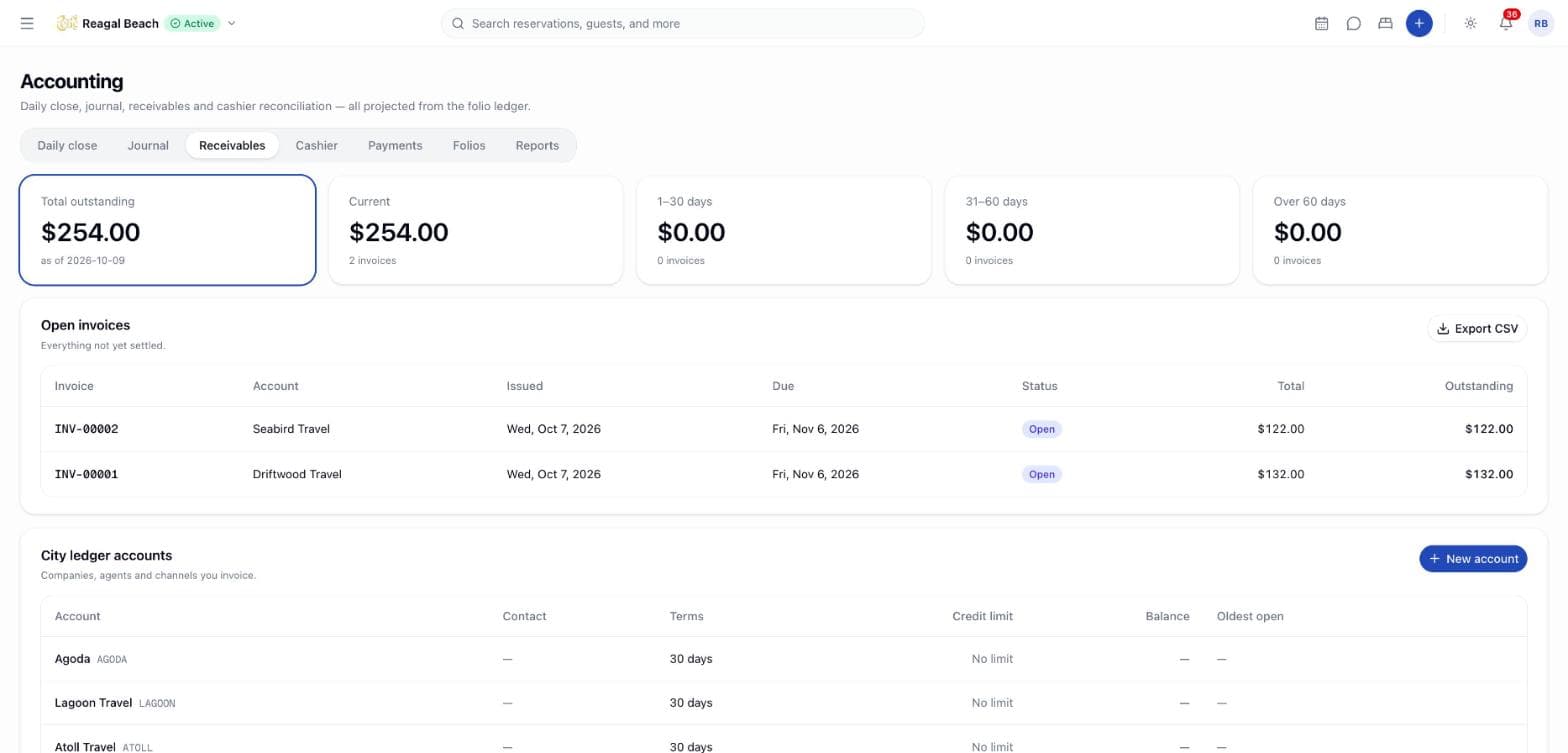
Where it lives
Open Accounting in the sidebar and choose the Receivables tab. The page has three parts, top to bottom: the aging strip, Open invoices, and City ledger accounts. Click an account name to open its page at /accounting/receivables/{id}.
Viewing needs accounting: read. Creating and editing accounts needs accounting: configure; transfers, receipts and credit notes need accounting: invoice. The Accountant and Administrator roles hold all three.
The same accounts are also reached from the front-office side under Companies & agents, where the partner's negotiated rates, bookings and proformas live beside the ledger view. One record, two doors — see Companies & agents.
Key terms
Ledger account — a billed party, with a Code, a Partner type, contact and billing details, a Currency, a Credit limit (0 = no limit) and Payment terms in days.
Partner type — Corporate, Travel agent, OTA (remits later) or Other. It decides what else the account carries: a travel agent gets a Commission (%), an OTA gets a Channel name, and everything but an OTA gets a Default billing on bookings.
Customer TIN — the partner's tax identification number. It prints on their proforma invoices and is reported as the Customer TIN on the GST Output Tax Statement (see Reports & exports).
Balance — open invoices minus receipts, per account. The Total outstanding across all accounts heads the page.
Aging — how long each open invoice has been outstanding, counted from its issue date, in four buckets: 0–30 days, 31–60 days, 61–90 days, 90+ days.
Statement — an account's invoices, receipts and credit notes over a period with a running balance.
Add a city ledger account
New account
Click New account in the City ledger accounts panel.
Fill in the details
The sheet is headed New city ledger account — A company, agent or channel billed after departure rather than paying at the desk. Code (short and unique, for example BHT) and Name are required.
Partner type decides the rest of the form. A Travel agent gains Commission (%), stored for reference only. An OTA (remits later) gains Channel name — As the channel reports it on bookings — and loses the billing-mode field, because a channel's stays are not billed through a company window. Everything else gains Default billing on bookings (Guest pays everything, Company pays room & tax, guest pays extras, Company pays everything), which the desk can override per booking.
Then add Contact name, Billing email and Billing address for the statement, a Credit limit (leave empty for No limit) and Payment terms (days), which sets every invoice's due date.
Create account
"{Name} added to the city ledger" confirms it. A duplicate code is refused ("Account code … is already in use").
To change an account later, open it and click Edit; the same form saves with Save changes. Deactivate an account from the same form when you stop doing business with it: it keeps its history and balance, shows an Inactive badge, and no longer accepts transfers ("{Name} is inactive; reactivate it before transferring").
The Customer TIN is not on the form yet
The TIN belongs to the account and is used wherever the partner's tax number has to be printed or reported — on their proformas, and as the Customer TIN column of the GST Output Tax Statement. The New account / Edit sheet has no field for it yet, so until one is added it is set through the accounting service rather than from this screen. An account with no TIN still appears on the statement; the column is simply blank.
The accounts table
| Column | Meaning |
|---|---|
| Account | Code and name; click to open |
| Contact | Contact name and billing email |
| Terms | Payment terms in days |
| Credit limit | Amount, or No limit |
| Balance | Open invoices minus receipts |
| Oldest open | Age in days of the oldest unsettled invoice |
Transfer a folio balance
From an account page click Transfer folio. The dialog explains that it settles the folio with a corporate payment and raises an invoice on the account for the same amount: enter the Folio, check Bill to (locked to this account), the Amount and notes, then Transfer. The folio receives a Payment with source Corporate, the account gains an invoice, and the daily close counts the amount under Transferred to city ledger. See Invoices for what happens next and the refusals (inactive account, credit limit, currency mismatch).
Channels invoice themselves
An OTA (remits later) account does not wait for anyone to transfer a balance. Give it the Channel name exactly as the channel reports it, and when an OTA-collected stay from that channel checks out, an invoice is raised on the account for whatever the channel still owes, due on the account's payment terms, with a note reading Collected by {channel} for {reference}.
That turns an anonymous amount sitting in the city ledger into a receivable with a name on it, which can be aged, chased and matched against the remittance. A virtual card the desk already charged nets the amount to nothing, so such a stay raises no invoice — there is nothing to chase. When the remittance arrives, record the receipt and handle the commission like any other account.
The full behaviour — the matching rules, what happens with no account for a channel, and why nothing is double-counted — is in Negotiated rates & company billing.
Watch aging
The strip at the top shows Total outstanding and one tile per bucket with its amount and invoice count. Click a bucket to filter Open invoices to that age; click it again to clear. The panel's description switches between Everything not yet settled and Filtered to the selected aging bucket. Export the filtered list with the CSV button (invoice, account, issued, status, total, settled, outstanding, currency).
An invoice past its due date shows Overdue regardless of bucket — buckets age from the issue date, the badge from the due date, so an account on 15-day terms can be overdue while still in 0–30 days.
Record a receipt
Open the invoice
From the account's Invoices panel or from Open invoices, click the number. The dialog is headed Record receipt · {number}.
Record receipt
Enter the Amount (pre-filled with the outstanding), the Method and a Reference such as the transfer or cheque number, then Record receipt. An amount above the outstanding is refused ("Receipt of … exceeds the outstanding …").
Read the result
"Receipt recorded against {number}" confirms it. The invoice becomes Part paid or Paid, the account balance falls, and the receipt appears on the statement as a credit.
A receipt recorded in error is reversed, not deleted: a negative row referencing it is added, the invoice goes back to outstanding and the credit is released on the account. That is not a refund — no money goes back to the payer.
Note the order of operations when a company short-pays and will not pay the rest: a credit note cancels the whole invoice and is refused once anything has been received against it ("Invoice {number} has {amount} received against it; refund the receipt before crediting it"). Either reverse the receipt and credit the invoice in full, or leave it Part paid and deal with the shortfall outside the document. See Invoices.
Statements
The account page shows Balance, Credit limit, Oldest open invoice and Open invoices tiles, then the Statement panel: pick a date range to see an Opening balance row followed by every Invoice, Receipt and Credit note with Date, Type, Reference, Description, Debit, Credit and a running Balance. Export it as CSV, or click Print statement for the browser's print dialog (the tabs and navigation are hidden on paper).
Common mistakes
- Transferring the whole folio. Settle the guest's own incidentals first; the transfer amount defaults to whatever is still outstanding.
- Ignoring the credit limit. A transfer that would push the balance over the limit is refused; raise the limit on the account or collect a receipt first.
- Mixing currencies. Each account has one currency; a folio in another currency cannot be transferred to it.
Related
Invoices
How a city-ledger tax invoice is raised from a folio, numbered, settled with receipts, cancelled with a credit note, printed, and what each status means.
Cashier
Open a drawer with a float, watch expected totals grow as you post payments, count and close the drawer with any variance explained, and review shift history.