

Companies & Agents
Partner records for corporate clients, travel agents and OTAs — one record is the profile, what bookings bill to and what invoices are raised on.
Open Companies & agents in the sidebar. The list at /companies is every partner that sends you business; clicking a name opens that partner at /companies/{id}.
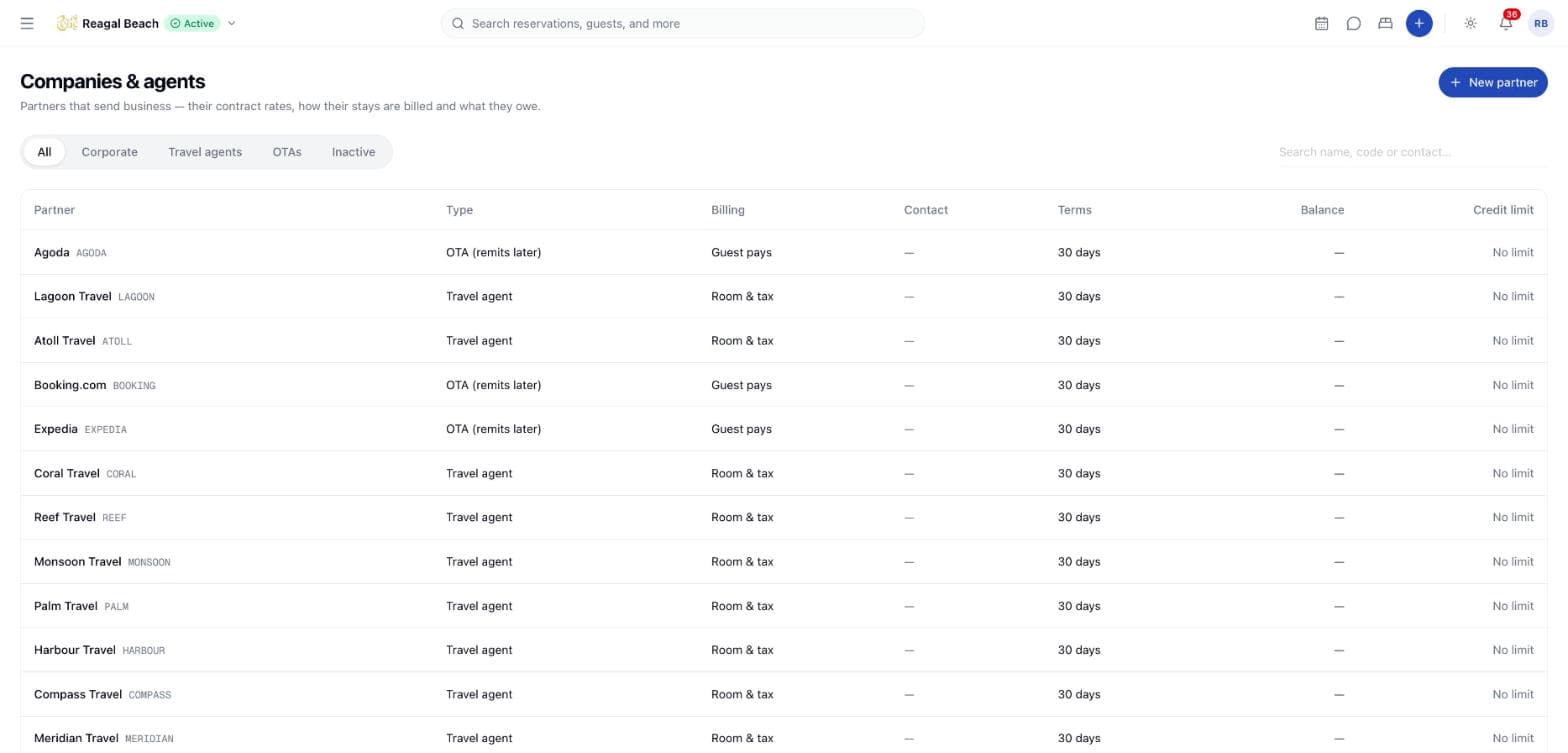
The important thing about a partner record is that there is only one of it. The same record is the profile you keep (who to call, what was agreed), the account a booking can be billed to, and the city-ledger account an invoice is raised on. There is no separate "client" to reconcile against an accounting code: when the desk picks a company on a booking and when the accountant chases an overdue invoice, they are looking at the same row. Companies & agents is that row seen from the front office; Accounting › Receivables is the same row seen from the ledger.
The page is shown to anyone who can see Accounting. Creating and editing a partner needs the accounting configure permission (folio: void until the accounting permission set ships).
Partner types
| Type | What it means |
|---|---|
| Corporate | A company whose staff stay with you. Usually billed after departure on agreed terms. |
| Travel agent | An agency that books on behalf of guests, at contract rates, often earning commission. |
| OTA (remits later) | A channel that collects from the guest and pays you afterwards, net of its commission. |
| Other | A plain receivable that is not a booking partner. These are the accounting side's business and are hidden from the All pill here. |
The type changes what the form asks for and what the detail page shows: a travel agent gets a Commission (%) field, an OTA gets a Channel name instead of a default billing mode, and an OTA has no Negotiated rates tab at all — a channel sells at its own price, so there is no contract rate to keep.
The partner record
New partner
Click New partner. The sheet is headed New city ledger account and describes what you are creating: "A company, agent or channel billed after departure rather than paying at the desk."
Identify the partner
Code — short and unique, such as BHT — and Name are both required. A code already in use is refused ("Ledger account code {code} is already in use").
Choose the type
Partner type sets the fields below it. For a Travel agent, fill Commission (%); for an OTA, fill Channel name exactly as the channel reports it on bookings ("Agoda") — this is what makes remittance invoicing work, see Negotiated rates & company billing.
Set the billing default
Default billing on bookings is what a new booking on this account opens on the company window: Guest pays everything, Company pays room & tax, guest pays extras or Company pays everything. The desk can override it per booking. OTAs do not have one — their stays arrive already collected.
Add the contact and terms
Contact name, Billing email and Billing address go on the statement. Credit limit is in the property's currency; leave it empty for No limit. Payment terms (days) sets the due date on every invoice raised against the account.
Create the account
"{Name} added to the city ledger" confirms it. Open the partner later and click Edit to change anything; "{Name} updated" confirms that.
Fields
| Field | Notes |
|---|---|
| Code | Short, unique per property; what the account is quoted by |
| Name | The partner as it appears on invoices and statements |
| Partner type | Corporate, Travel agent, OTA or Other |
| Contact name, Billing email, Billing address | Who to send the bill to |
| Customer TIN | The partner's tax identification number, printed on their pro-forma invoices and reported as the customer TIN on the GST Output Tax Statement. Part of the record, but see the note below |
| Credit limit | In the property's currency; 0 means no limit. Transfers and company bookings beyond it are refused |
| Payment terms (days) | Days from issue to the due date on their invoices |
| Commission (%) | Travel agents only; stored on the record |
| Channel name | OTAs only; the channel name as Channex reports it |
| Default billing on bookings | What a booking on this account routes to the company window by default |
| Notes | Contract reference, who to call, special handling |
| Active | Turn off when you stop doing business with the partner |
An inactive partner keeps its history and balance, shows an Inactive badge, drops off the booking form's Company / agent select, and no longer accepts folio transfers. It cannot be deactivated while it still owes money ("Ledger account cannot be deactivated while it carries a balance of …").
The Customer TIN is not on the partner form yet
The TIN is part of the account record and is used wherever the partner's tax number has to be printed or reported, but the New partner / Edit sheet has no field for it. Until it is added, set it through the accounting service rather than from this screen.
The partner list
Five pills filter the list — All, Corporate, Travel agents, OTAs and Inactive — and the search box above the table matches on name, code or contact name. All shows active booking partners only: inactive accounts move under their own pill, and plain receivables of type Other are left out entirely.
| Column | Shows |
|---|---|
| Partner | Name and code; click to open. An Inactive badge where it applies |
| Type | Corporate, Travel agent, OTA (remits later) or Other |
| Billing | The default billing mode, shortened to Guest pays, Room & tax or Everything |
| Contact | Contact name, or the billing email when there is no name |
| Terms | Payment terms in days |
| Balance | Open invoices less receipts; blank when the account is clear |
| Credit limit | The limit, or No limit |
The partner page
The header gives the name, the code, the type as a badge, and a summary line: contact, billing email, the payment terms, and either the default billing mode or — for an OTA — "Channel: {name} · guests pay the channel, it remits net of commission", plus the commission percentage where one is set.
Four tiles follow:
| Tile | Shows |
|---|---|
| Balance owed | What the partner owes, with the age of the oldest open invoice beneath |
| Credit limit | The limit with how much of it remains, or No limit |
| Bookings | How many bookings the filters below have found, with how many are upcoming and in house |
| Negotiated rates | How many contract rates are on file, with the number of open invoices beneath |
Three buttons sit opposite: Print statement prints the page, Edit opens the account form, and Open in Receivables jumps to the same account in Receivables & city ledger for aging, transfers and receipts.
Tabs
Bookings — stays made through this partner. Filter by Stay dates and Booked on, and sort by arrival or booking date (latest or earliest first); Clear resets the filters. The table shows reference, guest, stay, rooms, the booking's own Billing mode, status and total, and each reference opens the reservation. With nothing to show it reads "Pick this partner under Company / agent when creating a reservation."
Negotiated rates — the contract: one rate per rate plan, with its validity. See Negotiated rates & company billing. Not shown for OTAs.
Invoices — the partner's pro-forma invoices above, and below them the invoices raised when a stay's company-window balance was transferred to the city ledger. Numbers, issue and due dates, status and outstanding amounts; see Invoices.
Statement — invoices, receipts and credit notes over a period with a running balance, opening and closing figures. This is the document a client queries, so it quotes document numbers rather than internal references.
Tips
- Give the code some thought. It appears beside the name everywhere and is what people quote back at you, so make it short and recognisable.
- Set the credit limit before the first booking, not after the first problem. It is enforced when a company booking is created, so a limit added later does nothing about exposure already on the books.
- Set the default billing mode to what the contract says. It saves the desk a decision on every booking, and it is still overridable per booking.
- Use Inactive rather than deleting. The history, the invoices and the statement all stay where the accountant can find them.
Related
Master Folio & Group Billing
The group's own bill, the two billing modes Innvera supports, how a member's room and tax reach the organiser, and where groups appear in Accounting.
Negotiated Rates & Company Billing
Keep a partner's contract rates per rate plan, bill their stays to the company window, and let the credit limit and OTA remittance do their work.