

Payments
Record cash, card, bank and voucher money against a folio, take deposits, give refunds, reverse mistakes, and set up payment methods and hardware.
Money is recorded on the folio, next to the charges it settles. A payment is always entered as a positive amount; its type says which way the money moved, and its source says who paid. Like charges, payments are never edited or deleted — a wrong payment is reversed with an offsetting row.
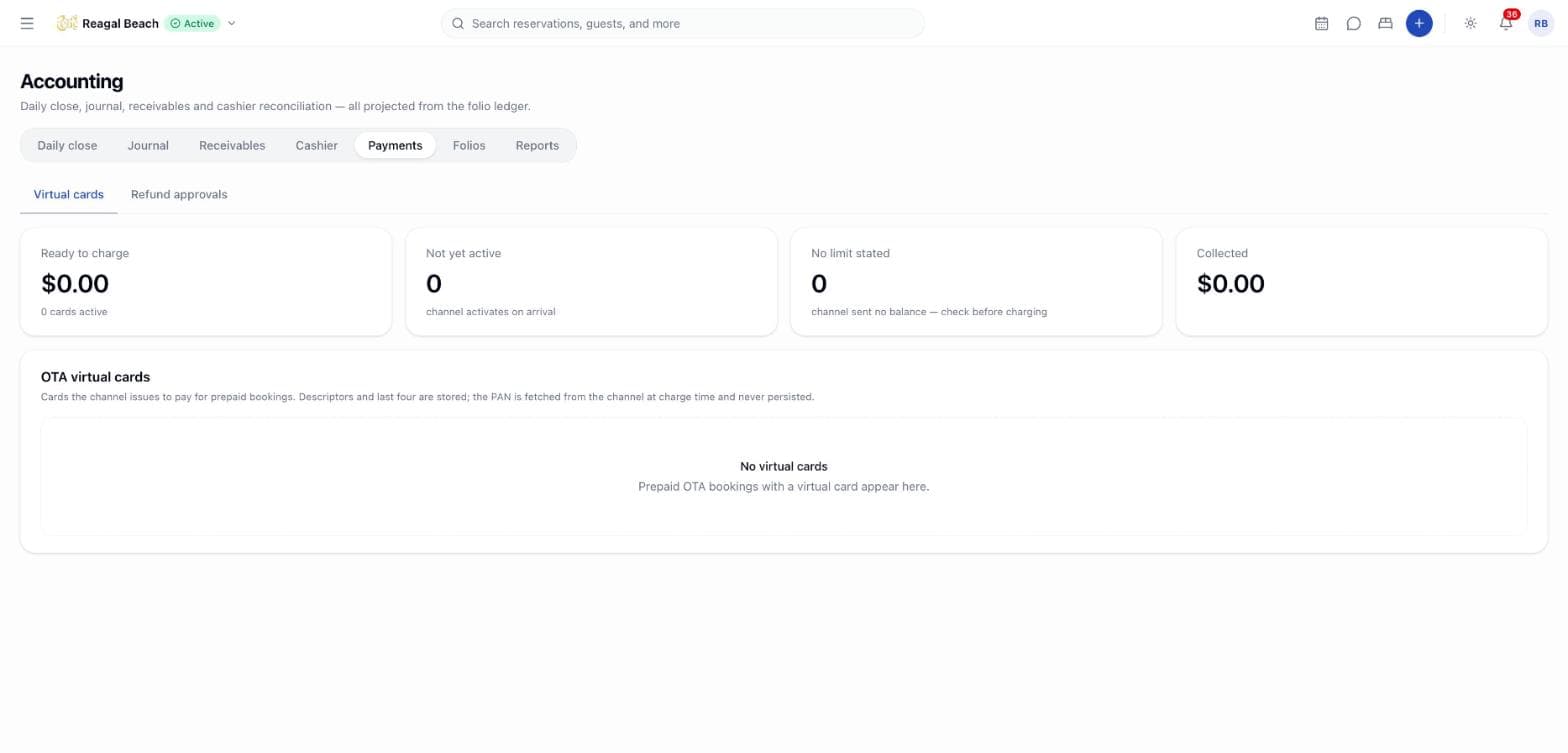
Recording and reversing payments happens on the folio (the reservation's Folio tab, or Billing & Folio) and needs the folio: post permission. The Accounting › Payments tab covers card gateway transactions, OTA virtual cards, payment links and refund approvals.
Key terms
Type — Payment, Deposit (part payment before arrival), Prepayment (stay paid in full ahead of arrival, normally by the OTA), Refund (money given back) or Write-off (balance the property stops chasing). Only a refund reduces the settled amount; a write-off settles the balance like a payment.
Source — Guest, Corporate, Voucher, or OTA for channel-collected money.
Method — free text, typed as your property says it: cash, visa, bank transfer. Accounting groups each spelling into Cash, Card, Bank transfer or Other (see Payment methods below).
Record a payment
Open Record Payment
On the folio click Record Payment. The button is hidden once the folio is Closed.
Type and source
Choose the type (Payment, Deposit, Refund, Write-off) and the source (Guest, Corporate, Voucher). Prepayment and the OTA source are not offered: those rows are written by the channel import, never by hand, so nobody can mark a folio settled without money arriving.
Amount, method and reference
Amount is pre-filled with the outstanding balance; change it for a part payment. Type the method as you name it at the desk, add the receipt or transaction number as Reference, and any Notes. The currency is always the folio's — a payment cannot be taken in another currency.
Record Payment
The payment appears in the Payments table with your name and the time. You see "Payment recorded", or "Payment recorded — folio settled" when the balance reached zero and the status became Settled.
For a Refund the dialog reminds you: A refund reduces what the guest has paid. Use it when money actually leaves the property — for an overpayment shown as REFUND DUE, for example. To undo a payment that never really happened, reverse it instead.
Reverse a payment
Click the reverse icon (Reverse this payment) on the row, enter why in Reverse Payment, and confirm. Innvera posts a mirror row of the same type and amount with the opposite sign, so the pair sums to zero; the original gains a Reversed badge and the reversal shows as Reversal of Payment · visa with your reason. "Payment reversed" confirms it and the balance recalculates.
- A payment can be reversed once; a second attempt is refused with "Payment has already been reversed".
- Rows with source
OTAhave no reverse action and the ledger refuses them: "OTA-collected payments cannot be reversed in the PMS; correct this with the channel". The property never held that money.
Deposits and prepayments
Take a Deposit before arrival by recording a payment of type Deposit on the reservation's folio; it counts toward the balance from the moment it is posted. For a channel booking that was paid to the OTA, the channel import posts the room charge as usual and settles it with a system Prepayment (source OTA, badge OTA) so revenue is still reported while the balance nets to zero; a later price revision from the channel adjusts the prepayment by the difference.
Whether deposits count as revenue when received or sit in Deposits Held until arrival is chosen under Settings › Accounting › Revenue & currency (Revenue recognition: Cash basis or Deferred), and the Deposits report lists every deposit as Held, Applied, Refunded or Forfeited — see Reports & exports.
Payment methods
Methods are free text on purpose — properties differ — but reconciliation needs them grouped. Settings › Accounting › Payment methods lists every spelling that has ever been used (Method as typed), how many payments carry it, and its Group: Cash, Card, Bank transfer or Other. Unmapped spellings are pinned to the top with an n unmapped badge; anything unmapped counts as Other, and the daily close raises a warning naming it. Map each spelling once and every past and future payment with it groups correctly.
Card payments, virtual cards and payment links
Two of these four tabs are hidden until a gateway is connected
Virtual cards and Refund approvals are live: the property runs the OTA's card on its own terminal, and approving a refund needs no provider at all. Card payments and Payment links need a card gateway, and none is connected yet, so they do not appear on the tab row in a normal build — hidden rather than shown with invented transactions beside the property's real money. What follows describes all four.
Card payments lists gateway transactions with When, Reservation, Card, Status, Authorised, Captured and Refunded, plus tiles for Held on card, Captured (net), Awaiting 3-D Secure and Declined. Authorise card takes an in-house Reservation, an Amount and card details in a hosted field. A transaction moves through Pending 3DS → Authorised → Captured / Partially captured, or Voided, Refunded, Failed. From a row's menu: Capture… (full or partial, never over the authorisation), Void authorisation (only while nothing is captured), Refund to card… (never over what was captured), and copy the provider reference.
Virtual cards shows cards issued by Booking.com, Expedia, Agoda or Airbnb for prepaid bookings — descriptor, last four and the Activates date. Charge (or Retry after a failure) takes up to the available amount; charging before the activation date fails and the failure is recorded on the card. Statuses: Not charged, Partially charged, Charged, Failed, Expired.
Payment links sends a hosted payment page to the guest. New link asks for the Reservation, Purpose (Deposit, Balance, Prepayment), Send by (Email, SMS, WhatsApp), Amount and Expires in (days). Each link is Sent, Opened, Paid, Expired or Cancelled; you can copy the URL, Resend, Cancel link or Open hosted page.
Refund approvals is the queue behind card refunds. Request refund names the payment, amount and Reason. Under the threshold set in Settings › Accounting › Numbering & approvals the request executes at once; above it, an approver clicks Approve or Reject (a rejection requires a note), then Execute refund releases the money the way it came. Statuses: Pending, Approved, Rejected, Executed.
Payment gateway
Settings › Accounting › Payment gateway chooses the Provider — Stripe (cards, wallets, payment links; settles in USD), Adyen (cards and local methods; strong 3DS tooling) or Mastercard Gateway (BML) (local acquiring through Bank of Maldives; MVR settlement) — the Mode (Test — no real money moves or Live), the Publishable key and Secret key (only the tails are shown back), a 3-D Secure switch, and Capture: Manual — authorise at check-in, capture at checkout or Automatic — capture on authorisation.
No provider is wired yet
Choosing a provider records the preference only; no gateway is connected and Test connection simulates a successful response. Card money today is recorded on the folio with Record Payment after the terminal approves it.
Cash drawer and receipt printer
Settings › Accounting › Drawer & printer holds the front-desk hardware preferences: Cash drawer on or off and Kick the drawer on (Cash payments only, Every payment, Never — open manually); the Printer name, Paper width (80 mm or 58 mm), Print a receipt (Always, after every payment, Ask each time, Never — on request only), Header lines and Footer. Print test receipt opens a Receipt preview in the chosen width that prints through the browser; the same preview is available from the print-receipt icon on each row of the Settlement report. Driving a physical drawer or a network printer directly is not wired yet — receipts print through the browser meanwhile.
Common mistakes
- Recording a refund to fix a typo. A refund claims money left the building. Reverse the wrong payment and record the right one.
- Inventing a new method spelling. Visa, visa card and VISA/MC are three methods until mapped. Agree spellings at the desk, or map them in settings.
- Taking a payment in another currency. The folio's currency is fixed; convert first and note the original amount in Notes.
Related
Charges & Postings
Post a charge or discount by hand, understand what Innvera posts automatically, correct a line with a void, and read the audit trail behind every posting.
Proforma Invoices
Issue a statement of a stay's expected charges so a company can raise a purchase order or a guest can wire a deposit — without posting anything to the folio.