

Journal
Read the double-entry journal Innvera derives from folios and the city ledger, filter it by date and account, check the trial balance, and export it.
The journal is the bookkeeper's view of the ledger: every charge, payment and city-ledger movement expressed as a debit and a credit against the chart of accounts. Innvera does not store a second set of entries. Each journal row is computed from the folio and city-ledger rows using the posting rules in settings, so the journal can never disagree with the folios and a period re-run next year returns the same numbers.
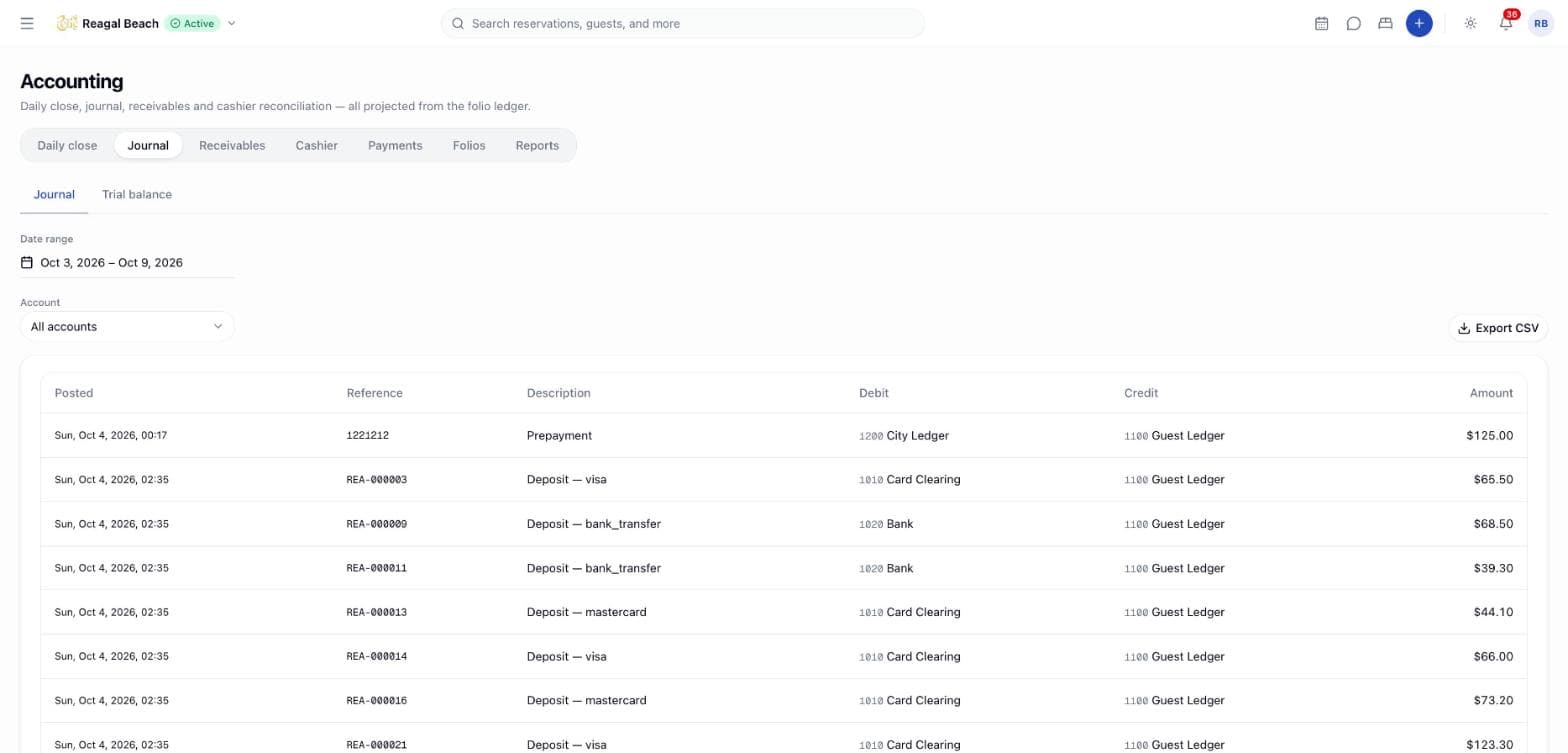
Open Accounting in the sidebar and choose the Journal tab. It has two views, Journal and Trial balance.
Key terms
Entry — one derived row: a posting date, business date, reference, description, one debit account, one credit account and an amount.
Source — where the entry came from: a folio line item, a folio payment, a city-ledger receipt or a credit note.
Reversal — an entry derived from a voided line or reversed payment. It uses the same rule as the original with a negative amount, so the pair nets to zero.
Trial balance — total debits and credits per account for the range. Because every entry has one debit and one credit, the two totals must be equal.
What generates an entry
| Ledger row | Seeded rule |
|---|---|
Room Charge | Debit 1100 · Guest Ledger, credit 4000 · Room Revenue |
Adjustment | Debit Guest Ledger, credit 4900 · Rate Adjustments |
Extra Charge, Early Check-in Fee, Late Check-out Fee | Debit Guest Ledger, credit 4200 · Other Revenue |
Cancellation Fee, No-show Fee | Debit Guest Ledger, credit 4300 · Cancellation & No-show Revenue |
Discount | Debit Guest Ledger, credit 4400 · Discounts & Allowances — stored as a negative line, so the pair flips and the allowance is debited |
Tax | Debit Guest Ledger, credit 2200 · Tax Payable |
Payment or Deposit by method group | Debit 1000 · Cash in Hand / 1010 · Card Clearing / 1020 · Bank, credit Guest Ledger. A method mapped to Other, or not mapped at all, debits 9999 · Suspense |
Prepayment (collected by a channel) | Debit 1200 · City Ledger, credit Guest Ledger — the property is owed it by the OTA, not by a bank |
Payment with source Corporate (a city-ledger transfer) | Debit 1200 · City Ledger, credit Guest Ledger |
Refund | Debit Guest Ledger, credit the asset the money went out of |
Write-off | Debit 5200 · Bad Debt, credit Guest Ledger |
| City-ledger receipt | Debit cash / card / bank, credit City Ledger. A receipt reversal is the same entry negated |
| Credit note | Debit 4400 · Discounts & Allowances, credit City Ledger |
| Anything with no matching rule | 9999 · Suspense on one side — visible, never dropped |
Every charge rule is the same shape — debit the guest ledger, credit the account the line belongs to — and one rule serves both directions, because the engine flips a negative row's debit and credit. That is why a discount and a void need no rules of their own.
A tax invoice is not projected. The money moved when the Corporate payment settled the folio and debited the city ledger; projecting the invoice as well would count it twice. Receipts and credit notes against that invoice are projected, because they move money that nothing else has recorded.
With OTA commission accrual switched on in Revenue & currency, each OTA-collected payment also posts 5300 · OTA Commission against 2300 · OTA Commission Payable at the channel's rate; a settlement taken in a second currency is converted at the configured rate. Which rule applies is configured under Settings › Accounting › Posting rules — see Accounting settings.
Deposits are not deferred yet
2100 · Deposits Held is in the default chart, but no seeded rule uses it: a deposit taken at the desk settles the folio balance the moment it is posted, so it credits the guest ledger like any other payment. The Revenue recognition setting changes how the Deposits report reads, not where a deposit posts. Holding deposits as a liability until arrival needs an "apply on arrival" step the folio does not have.
Read the journal
Pick a range and account
Date range defaults to the seven days ending yesterday. Account narrows the list to entries touching one account on either side; All accounts is the default.
Read the rows
Columns are Posted, Reference, Description, Debit, Credit and Amount. The reference is the reservation code or invoice number; a reservation code links to the reservation. Reversal rows are muted with a reversal marker. Fifty entries show per page.
Export
The CSV button downloads the current range and account filter as journal_{from}_{to}.csv with posted at, business date, reference, description, debit code and account, credit code and account, amount, whether it is a reversal, and the source. Amounts are plain decimals with no currency symbol so spreadsheets import them cleanly.
An empty range reads No journal entries — Nothing was posted to the ledger in this range, or the account filter excludes everything.
Trial balance
Switch to Trial balance for the same date range summarised per account: Code, Account, Type (Asset, Liability, Equity, Revenue, Expense), Debit, Credit and Net. The footer states Balanced with the two totals, or Out of balance — debits and credits differ in red. It should never be out of balance; if it is, something reached the ledger without a rule or a rule was changed mid-period — check Suspense in the journal first. Export it as trial-balance_{from}_{to}.csv.
Bookkeeping exports
For a file your accounting package can import directly (Xero manual journal, QuickBooks Online journal entries, generic CSV), use Settings › Accounting › Exports, which builds from the same entries — see Reports & exports.
Tips
- Set account codes before month end. The journal carries whatever codes are in your chart of accounts; make them match your bookkeeping file and the export imports without remapping.
- Filter by Suspense once a week. Any entry there is a payment method or line type without a rule.
- Use the reference link. Clicking the reservation code opens the reservation, and its Folio tab shows the line the entry came from.
Related
Cashier
Open a drawer with a float, watch expected totals grow as you post payments, count and close the drawer with any variance explained, and review shift history.
Daily Close & Night Audit
Review one business date's revenue, tax, settlement and guest-ledger movement, fix what the checks flag, and close the day so its figures are snapshotted.