

Daily Close & Night Audit
Review one business date's revenue, tax, settlement and guest-ledger movement, fix what the checks flag, and close the day so its figures are snapshotted.
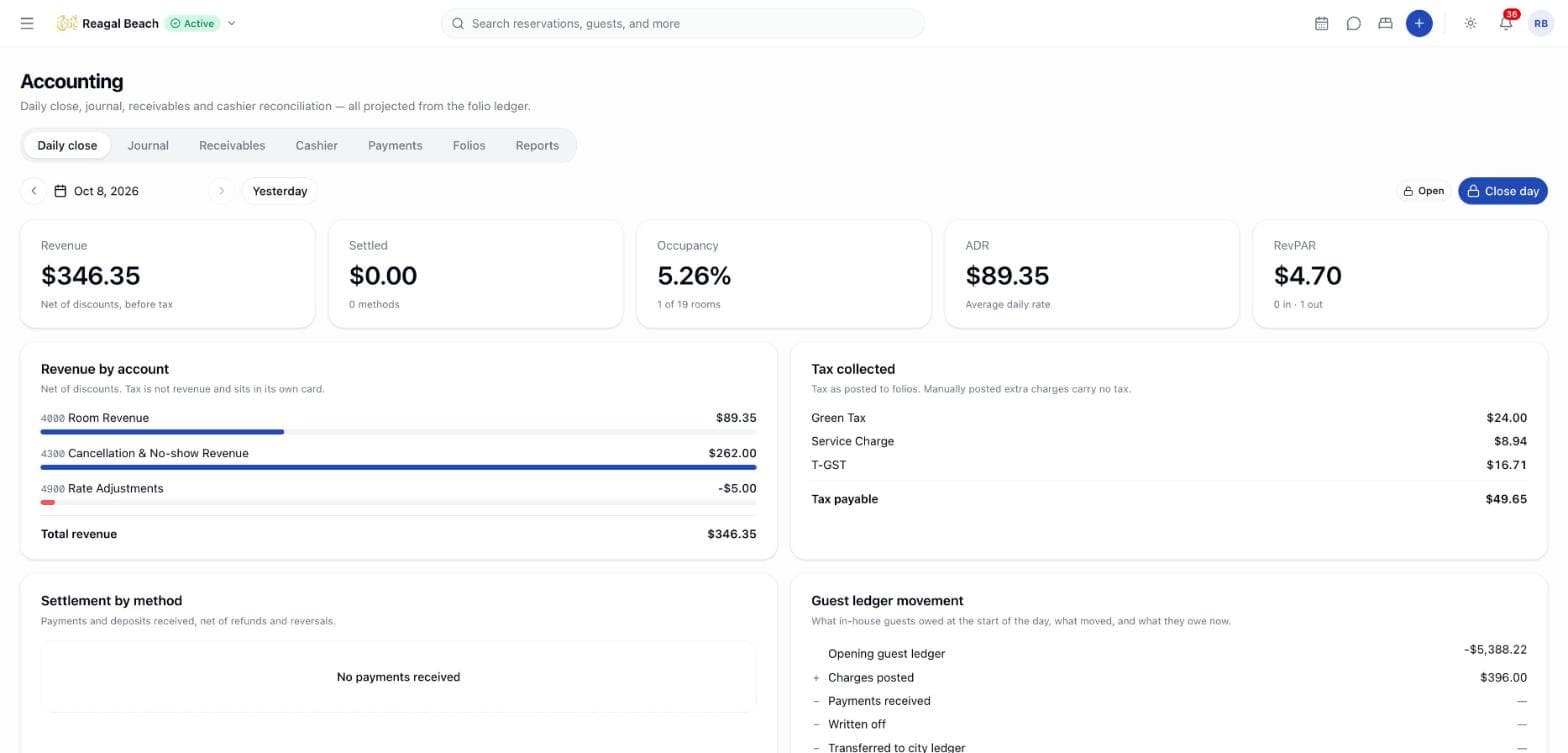
The daily close is Innvera's night audit. For one business date it gathers revenue by account, tax by head, settlement by payment method, occupancy figures and the movement of the guest ledger, and lets an authorised user close the day: the figures are stored as a snapshot together with who closed it and when. It is the first tab of Accounting in the sidebar, at /accounting.
Closing is not a mutation of the ledger. Folios go on accepting postings; if something lands on a closed date afterwards, the page shows the difference as drift instead of silently changing a closed number.
Key terms
Business date — the property's day, not a timestamp. It rolls over at the hour set under Settings › Accounting › Revenue & currency › Business day rolls at, so a 2 a.m. payment can belong to the previous date.
Snapshot — the computed close stored verbatim when the day is closed.
Drift — stored closing guest-ledger balance minus the balance the day's movement implies. Zero unless a posting landed after the close or a folio mirror went stale.
Method group — Cash, Card, Bank transfer or Other, from the payment-method mapping.
The routine
Pick the date
The page opens on yesterday — you close the day that has finished. Use the date picker, the Previous day / Next day arrows or the Yesterday button. Today and future dates show the badge Not yet ended and cannot be closed; a past open date shows Open.
Clear the warnings
A yellow banner such as 1 payment method is unmapped names methods used that day that are not assigned to cash, card or bank and therefore count as Other. Click Map them in settings, group them, and come back. Closing is not blocked, but settlement by method will be wrong until they are mapped.
Check the tiles
Revenue (Net of discounts, before tax), Settled (with the number of methods), Occupancy (in-house of rooms available), ADR and RevPAR (with arrivals and departures). Compare them with what the desk expects for the day.
Read the four cards
Revenue by account — one line per revenue account (Room Revenue, Extra Charges, Fees, Discounts as a negative) and Total revenue. Tax is not revenue and sits in its own card.
Tax collected — one line per tax head and Tax payable. Tax as posted to folios. Manually posted extra charges carry no tax. Every Tax line is listed by head, including a line item typed Fee such as a service charge — so a service charge appears here beside T-GST even though the tax return treats it as revenue. See Reports & exports.
Settlement by method — payments and deposits received, net of refunds and reversals, per group and method, with Total settled; when the desk takes a second currency, of which taken in {currency} shows the converted amount, and with commission accrual on, OTA commission accrued.
Guest ledger movement — the identity the audit asserts: Opening guest ledger + Charges posted − Payments received − Written off − Transferred to city ledger = Closing guest ledger.
Resolve drift
If the identity does not hold, a red alert reads Ledger drift of {amount} — The stored closing balance is … but the movement above implies …. A posting landed after the day was closed, or a folio balance mirror is stale. Recompute before reporting this day. Find the late posting in the Journal for that date; the drift is informational and is never auto-corrected.
Close day
Click Close day. The confirmation, Close {date}?, explains that it snapshots today's revenue, tax and settlement figures and records who closed the day. Postings that land afterwards are still accepted by the ledger, but they show up here as drift rather than silently changing the closed numbers. Confirm; "{date} closed" appears and the badge becomes Closed by {name} · {time}.
Below the cards, Revenue, last 14 days charts closed days only, ending on the selected date, so a gap in the chart is a day nobody closed.
What closing does and does not do
| Closing a day… | |
|---|---|
| Stores the snapshot and who closed it | Yes |
| Prevents closing the same date twice | Yes — "Business date {date} is already closed" |
| Prevents closing a date that has not ended | Yes — "A business date can only be closed once it has ended" |
| Locks folios or blocks postings | No — folios lock individually at check-out |
| Closes cashier drawers | No — each cashier closes their own (see Cashier) |
| Posts anything to the ledger | No — the journal is derived, so there is nothing to post |
Fixing blockers
- "Requires accounting close permission" on the button — closing needs
accounting: close, which the Accountant and Administrator roles hold and the front desk does not. Ask a manager or the accountant. - Unmapped methods — map them under Settings › Accounting › Payment methods; the settlement card recalculates immediately.
- Tax looks low — remember manual extra charges post net of tax; the card reports tax that was actually posted.
- Tax looks high — a service charge is a
Taxline on the folio, so it is counted on this card. Subtract the fee heads before reconciling against what you owe MIRA. - A late charge after closing — leave the snapshot, note the drift, and make sure the journal export for the period includes the late row (it will, because the journal is computed live).
Reopening a closed day — coming soon
There is no control to reopen or re-snapshot a closed date. Because the numbers are derived, a closed day can always be recomputed; the drift alert is how a difference is surfaced today.
Related
Journal
Read the double-entry journal Innvera derives from folios and the city ledger, filter it by date and account, check the trial balance, and export it.
Reports & Exports
The six reports under Accounting › Reports, how to read and export each one, and the MIRA returns and bookkeeping exports under Settings › Exports.