

Folios
What a folio is, how to read one, how it settles and closes, and how the Accounting › Folios tab splits a stay into guest, company and group windows.
A folio is the bill for one reservation. It is created the moment the reservation is created, priced in the reservation's currency, and holds two ledgers side by side: line items (everything charged) and payments (everything received or given back). Its balance is always charges minus settlements, computed live from those two lists.
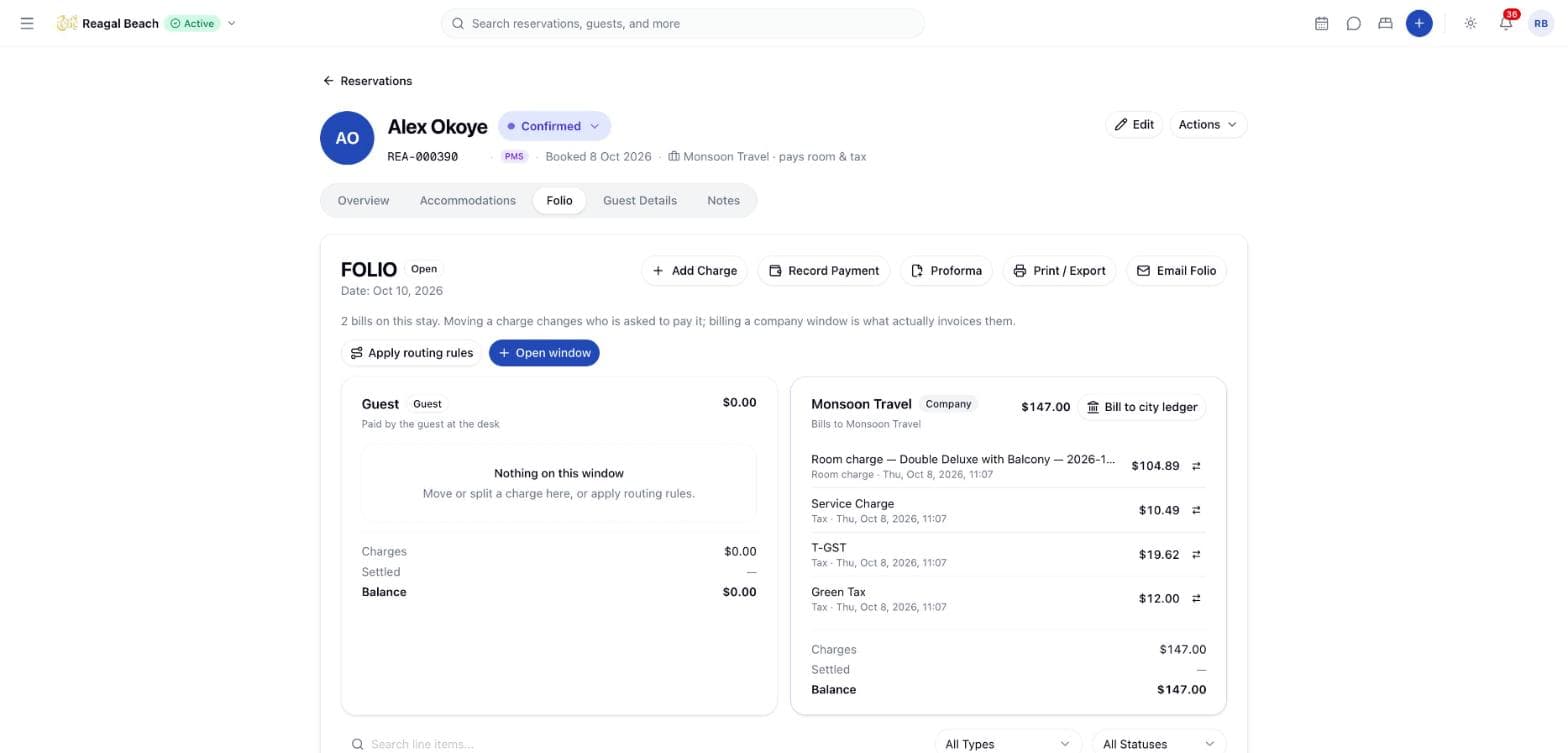
Open a folio from the reservation (the Folio tab on the reservation page) or from Billing & Folio at /billing, which lists reservations and opens each one's folio with View Folio. The list filters by guest name, status (On Hold, Confirmed, In-House, Checked Out, Cancelled, No Show), room type and check-in date range.
Key terms
Line item — one charge on the folio: Room Charge, Extra Charge, Discount, Tax, Adjustment, Cancellation Fee, No-show Fee, Early Check-in Fee or Late Check-out Fee.
Payment — money against the folio: Payment, Deposit, Prepayment, Refund or Write-off. Only a refund reduces what has been settled; a write-off settles the balance exactly as a payment does, it is simply reported differently.
Reversal — the append-only way to correct either side. A voided line or a reversed payment stays on the folio, marked, with a new opposite row next to it.
Window — a sub-ledger inside one stay (guest, company or group master) that charges can be routed to, so one folio can be settled by more than one payer.
Reading the folio
The heading shows FOLIO with a status badge, then the actions Add Charge, Record Payment, Proforma (while the stay is still On Hold, Confirmed or In-House — see Proforma invoices), Print / Export and Email Folio. Below, a search box and two filters narrow the line items: Type (all nine line types) and Status (Active / Voided); Clear resets them. Ten line items show per page.
The line-item table has Description, Qty, Unit Price and Total. Under each description you see when it was posted and by whom (system postings show no name). A voided line carries a Voided badge, its Reason, and a struck-through amount; discounts show in green. Each row has a history icon (View history) and, on live original lines, a void icon (Void this line item).
The totals block reads:
| Row | Meaning |
|---|---|
| Subtotal | All non-tax line items, net of discounts and reversals |
| TOTAL | Subtotal plus tax lines |
| Payments & credits | Payments, deposits, prepayments and write-offs, less refunds, net of reversals |
| BALANCE DUE / REFUND DUE | Total minus payments & credits. Red when the guest owes; green when the property owes the guest |
The Payments section lists each payment as type · method (for example Payment · visa) with its reference, date, who posted it and the amount. A reversal appears in italics as Reversal of … with the reason; the original gains a Reversed badge. OTA-collected money carries an OTA badge and no reverse action, because the property never held it.
Statuses
| Status | When | What it allows |
|---|---|---|
Open | Balance above zero | Charges and payments |
Settled | Balance reached zero or below | Still accepts postings — a new charge reopens it as Open. The first settlement date is kept even if it settles again later |
Closed | Locked at check-out | No further postings. Add Charge is disabled ("This folio is closed") and Record Payment is hidden; the ledger refuses with "Folio is closed; reopen it before posting" |
A reservation that is checked out cannot receive new charges either ("Checked-out reservations can't receive new charges").
Settling and closing
Settle before departure
Record payments until BALANCE DUE reads zero (see Payments). The status flips to Settled on its own.
Check out
Check-out locks the folio as Closed in the same transaction that changes the reservation status. A late check-out fee, if the property charges one, is posted first so it forms part of the balance being checked.
Departing with a balance
If money is still owed, check-out is refused with "Cannot check out: … is still outstanding on the folio". When the property allows departure with a balance, the Outstanding balance dialog asks for an Override reason and Check out with balance records it on the audit log. Bill the remainder to a company account afterwards (see Receivables & city ledger).
Reopening a closed folio — coming soon
The ledger treats reopening as a deliberate supervisor action rather than a side effect of posting, but there is no reopen control in the interface yet. Overpaid guests are not blocked at check-out: a negative balance shows as REFUND DUE and the folio still closes.
Printing and emailing
Print / Export fetches a print-ready page (property name and address, guest, dates, room type, nights, every line item, tax lines, subtotal and total) and opens it in a new tab for the browser's print or save-as-PDF. If nothing opens, allow pop-ups for the site.
Email Folio — coming soon
Email Folio currently only confirms the guest's address on file ("Invoice sent to …") and does not send anything yet. Print to PDF and attach it instead.
Windows, routing and groups (Accounting › Folios)
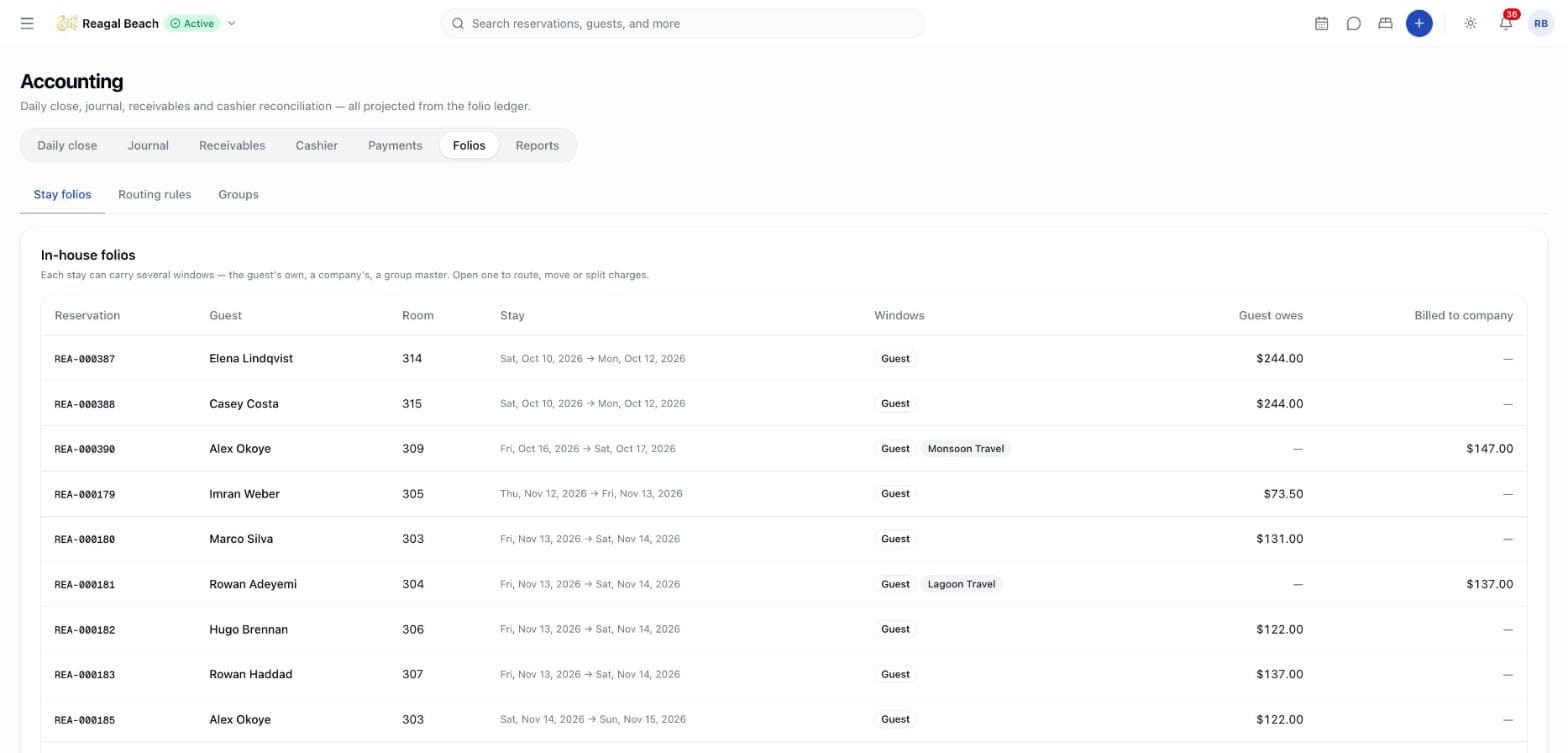
Stay folios lists in-house stays with their windows and what the guest owes. Opening one shows each window — Guest window, a Company window billed to a city-ledger account, or a group Master — with its charges, settled amount and balance, and which routing rule placed each line.
- Open window — choose Kind (
Company — bills a city-ledger accountorGuest — a second guest window (e.g. sharer)), the Bill to account for a company window, and a Label. - Move charge — from a line's move icon, pick To window; switch on Split — move only part of it and enter Amount to move to leave the remainder behind. The stay's total never changes.
- Apply routing rules — re-buckets the stay's lines according to the Routing rules tab; it requires a company window first.
- Routing rules — New rule with a Name, Route to (
Company window,Guest window,Group master) and the Charge types it applies to. Removing a rule affects future postings only. - Groups — each in-house group block shows master charges, settled and balance, the guests' own incidentals, a Room & tax → master switch per member, and Post master payment.
Common mistakes
- Looking for a deleted line. Nothing is deleted; filter Status to
Voidedto see corrections, or open a line's history. - Expecting Subtotal to include tax. Tax lines are excluded from Subtotal and added in TOTAL.
- Reversing an OTA prepayment. It cannot be done in the PMS; correct it with the channel.
Related
Overview
How money moves through Innvera, from the reservation's folio to the journal and the daily close, and where each screen lives.
Charges & Postings
Post a charge or discount by hand, understand what Innvera posts automatically, correct a line with a void, and read the audit trail behind every posting.