

Taxes and Fees
Define tax and fee line items, group them into ordered tax sets, and read the arithmetic they produce on a quote, a folio and the tax return.
Taxes & fees lives under Settings → Accounting → Taxes & fees. (The old address /taxes still works and redirects here.) It is a two-part catalogue. Line items are the individual taxes and fees the property charges — T-GST at 17%, a service charge at 10%, Green Tax at 6 USD per person per night. Tax sets group line items, in a cascade order, into the bundle a rate plan uses.
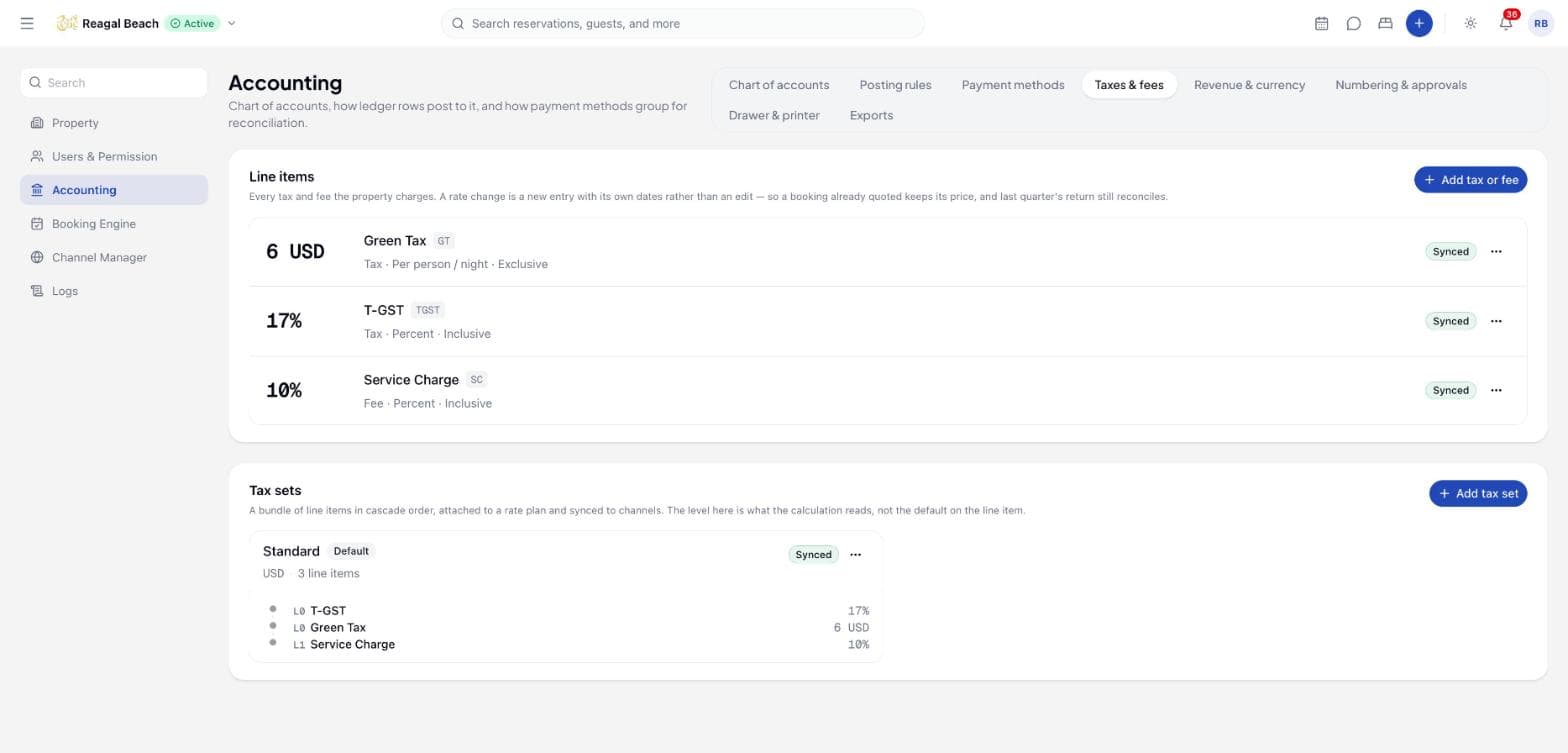
These are the same rows the reservation quote prices with and the tax return files from: one definition of what a guest is charged, used everywhere. A rate plan references one tax set; a plan with no set uses the property's default set. Reading needs tax: read; adding and editing need tax: write plus the accounting configuration permission.
Key terms
Charged as — Percentage of the price or Flat amount.
Charged — what a flat amount is multiplied by: Once per booking, Per night, Per room, Per room, per night, Per person, Per person, per night. A percentage has no such control, because there is no "17% per person" to store.
Type — Tax (A statutory charge you remit), Fee (Service charge and the like — yours to keep) or City tax (A municipal levy). The choice decides how the amount is reported on the tax return.
Included in rate — an inclusive tax is already inside the price the guest was quoted and is carved out of it; an exclusive one is added on top.
Level — where the line sits in the cascade inside a set. 0 is the net price; each higher level is charged on the running total of the levels below it.
Default tax set — the first set created for the property, marked with a Default badge. It cannot be changed afterwards (Innvera mirrors Channex here).
Add a tax or fee
Open the form
Click Add tax or fee above the Line items list. The sheet is titled Add Tax.
Name it
Title * is the wording on the folio ("T-GST"). Code is the short form used on documents and filings ("TGST").
Say how it is charged
| Field | Rule |
|---|---|
| Charged as * | Percentage of the price or Flat amount |
| Type * | Tax, Fee or City tax |
| Charged * | Flat amounts only: once per booking, per night, per room, per room per night, per person, or per person per night |
| Rate * | A percentage must be between 0 and 100; a flat amount is in the currency below |
| Currency | Required for a flat amount (Currency is required for a flat amount). On a percentage it is optional and only needed if you set a cap. |
| Skip Nights | Optional: the first N nights are not charged (per-night logics only) |
| Max Nights | Optional: charge at most N nights |
| Included in rate (vs. added on top) | Switch; off means added on top |
| Applied on | The net price, The price plus level-0 charges, The price plus level-0 and level-1 charges — the default level when this line is added to a set |
Narrow it, if it needs narrowing
When it applies — Judged on the guest's arrival date. Leave a side blank for open-ended. In force from and Until bound a rate to a period.
Applicable currencies — Leave empty to charge it on every booking. Listing a currency skips the tax on bookings in any other one — it is never converted. Empty reads as Every currency.
Minimum charged / Maximum charged — a floor and a ceiling on the tax itself: "10%, but never more than 50". Both are in the currency above, so a capped tax needs one chosen.
Skip exempt guests — charge only occupants the property has not recorded as exempt (nationals, resident permit holders, children under the age you set in Exempt under age). This is the Maldives Green Tax rule; leave it off for T-GST and service charges, which everyone pays.
Collected at the property — keep the amount out of the rate sent to channels. The OTA quotes without it, the guest pays it at the desk, and it still posts to the folio and the tax return, on channel bookings too.
Save
Click Create Tax. The line appears in the ledger with its rate in large type, its type, logic and inclusive/exclusive wording underneath, and any narrowings on a third line (2026-01-01 → 2026-12-31, Collected at the property, USD only, Max 50.00 USD). It is pushed to Channex.
Edit from the row's ⋮ menu (Edit). Delete warns that the line will be removed and will no longer sync to Channex. If it is still in a tax set this will fail until you take it out of that set — and suggests the better move: To retire a tax instead, set its Until date — it stops applying to new arrivals while the bills that already carry it still reconcile. A line whose window has passed stays on the list with a Not in force badge.
A rate change is a new entry, not an edit
A rate change is a new entry with its own dates rather than an edit — so a booking already quoted keeps its price, and last quarter's return still reconciles. Close the old line the day before the new one opens; editing the rate in place rewrites what every future quote charges and leaves the old quarter unexplainable.
Three rules Channex has no field for
A date range, a currency list and an amount cap do not exist in Channex, so a synced tax using one will be quoted differently by an OTA than by the PMS. Such a line carries an amber warning triangle, and a banner at the top of the page counts them. Either drop the rule, or keep that tax out of the sets you sync.
Build a tax set
Open the form
Click Add tax set (enabled once at least one line item exists). The sheet asks for Title * ("Standard Taxes") and Currency *.
Add items and levels
Click Add tax for each row, choose the line and enter its Level (0–20). A tax can appear once per set. The level you set here is what the calculation reads — the Applied on value on the line item is only its default, so one tax can sit at different depths in two sets.
Save
Click Create Tax Set. The set appears in the Tax sets stack with its currency, its line count and its items listed in level order (L0 T-GST, L1 Service charge), and a Default badge on the property's first set.
Attach a set to a rate plan in the plan's Tax Set field; sets not yet synced to Channex are marked "(not synced)". Deleting a set warns that Rate plans referencing it there will need a new set assigned.
How the amounts are worked out
The base is the room stay plus children fees. From there the inclusive lines and the exclusive lines are handled differently, because one is already inside the price and the other is not.
Inclusive taxes are peeled from the outside in
An inclusive price is the room rate with every inclusive charge already multiplied onto it. Unwinding that has to happen in the same order it was built, so Innvera peels level 0 first, then each higher level off what is left.
Take a rate of 1,287.00 that includes a 10% service charge at level 1 and 17% T-GST at level 0. The price is room × 1.10 × 1.17, so:
| Step | Basis | Amount |
|---|---|---|
| T-GST, level 0, 17% of the gross | 1,287.00 | 187.00 (17/117 of 1,287.00) |
| Service charge, level 1, 10% of what remains | 1,100.00 | 100.00 (10/110 of 1,100.00) |
| Room charge | — | 1,000.00 |
The three add back to 1,287.00. Taking 10% of the gross for the service charge would have taxed the tax and left the room charge short.
Exclusive taxes stack from the top down
An exclusive set is walked from the highest level to level 0, each level charged on the running total so far and then added to it. So with "Service charge 10%, level 1" and "VAT 5%, level 0", both added on top, the service charge is computed first and VAT is charged on the room price plus the service charge. Put taxes that should not compound on the same level.
Per-unit amounts
| Charged | Amount |
|---|---|
| Percentage of the price | basis × rate % |
| Once per booking | rate |
| Per night | rate × eligible nights |
| Per room | rate × rooms |
| Per room, per night | rate × rooms × eligible nights |
| Per person | rate × chargeable guests |
| Per person, per night | rate × chargeable guests × eligible nights |
Eligible nights = nights − Skip Nights, capped at Max Nights. Chargeable guests = adults + children, less the recorded exempt occupants when Skip exempt guests is on; infants are outside every per-person tax already. A Minimum charged / Maximum charged is applied to the result, never folded into the rate — and a tax that computed to zero stays zero rather than being lifted to its floor.
Whether a tax applies at all
Both narrowings are all-or-nothing, judged on the arrival date: a tax that has lapsed, or that the property only levies in one currency, does not apply at a reduced rate — it does not apply. A flat amount set in another currency is converted at the property's own rate for the arrival date; if no rate is set the booking is refused rather than under-charged, with … is set in another currency and no exchange rate from X to Y is set. Add it under Settings > Accounting > Currencies. — the Revenue & currency tab of Accounting settings.
Inclusive vs. added on top, on the bill
- Added on top (switch off): the guest pays base + tax. The folio shows
Room Chargefor the base and aTaxline per tax. - Included in rate (switch on): the guest pays the base. The folio shows
Room Chargefor the base minus the inclusive amounts and aTaxline for each carved-out amount, so the lines still add up to what was quoted.
Either way room charge + tax lines = total.
Fees are revenue, not a tax head
A service charge is set up as a tax-set line so that it prices and posts alongside the taxes — but it is the property's own money, not money owed to the revenue authority. The Type field is what tells the two apart.
On the tax return, a line whose type is Fee is not reported as a tax head. Its amount is counted into revenue instead — it is part of what was sold, and therefore part of the GST base — while Tax and City tax lines are listed as heads with their taxable base and tax due. Set a service charge's type to Tax and it will drop out of your revenue and appear as a head you cannot remit; set a genuine tax to Fee and you will under-declare.
Where to check the result
Accounting → Reports → Tax return shows each tax head with its rate, taxable base and tax charged, a Green Tax block for the per-night levies, and the exempt supplies that carried no percentage tax. See Reports and exports.
Where taxes show
- New Reservation and Edit reservation: under Total, a Room charge line and one line per tax, by title.
- Folio tab: one
Taxline per tax, with the tax's title as the description, posted by the system when the reservation is created. Re-pricing after an edit or a move does not re-post taxes; the difference arrives as a singleAdjustmentline. - Channels: the set travels with the rate plan mapping, minus anything marked Collected at the property. OTA-reported taxes on channel bookings are stored separately on the Room details tab and are not mixed into the folio.
Common mistakes
- Creating the special set first. The first set you create becomes the immutable default, and every plan with Tax Set
Nonewill use it. Create the standard set first. - Editing a rate instead of dating it. Use In force from / Until so quotes already given keep their price.
- Reading an inclusive percentage off the gross. 100.00 inclusive of 17% is 85.47 + 14.53, not 83.00 + 17.00.
- Marking a service charge as
Tax. It then leaves your revenue and lands on the return as a head you do not owe. - Syncing a dated or capped tax. The OTA has no field for the rule and will quote a different number.
- Expecting per-room-type taxes. Taxes attach to rate plans, not room types; give each plan the right set.
Related
Policies
Check-in and check-out windows, cancellation tiers, pet, smoking and children rules, deposits and custom policies — and which of them the PMS enforces.
Facilities and Media
Maintain the hotel's facilities, the per-room-type amenity matrix and the image library that feed the booking engine and connected channels.