

Reservation Details
The reservation page at /reservations/[id] — header, status chip, the Overview, Accommodations, Folio, Guest Details and Notes tabs, and the Actions menu.
Every reservation has a full page at /reservations/[id]. Reach it by clicking a row in Bookings or a bar on the Calendar (both open the detail sheet first) and then View reservation, or straight from a global search hit. This is the screen for anything that takes more than a glance: settling the folio, checking in and out, editing the guest's registration details, naming everyone who is staying, and reading what has happened to the booking.
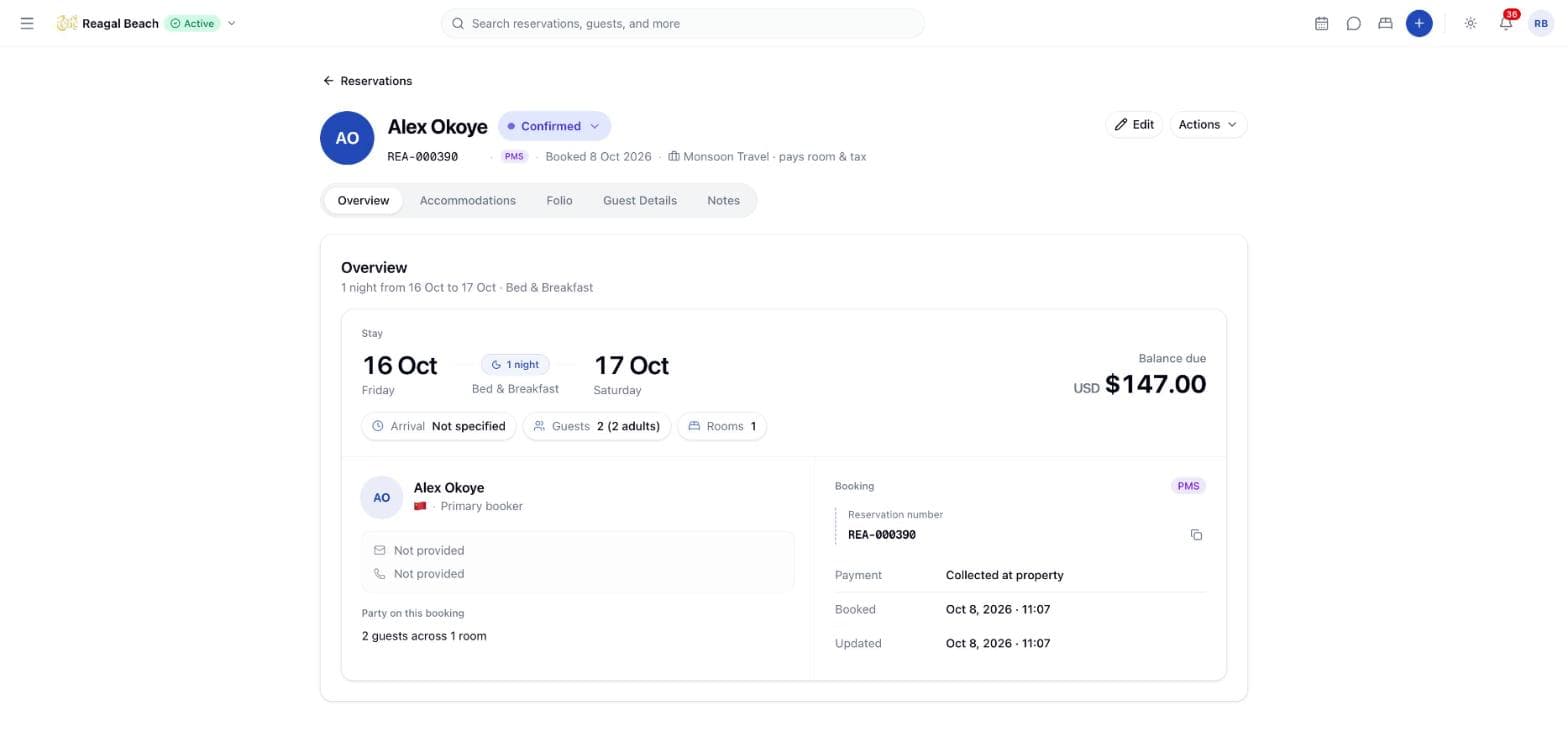
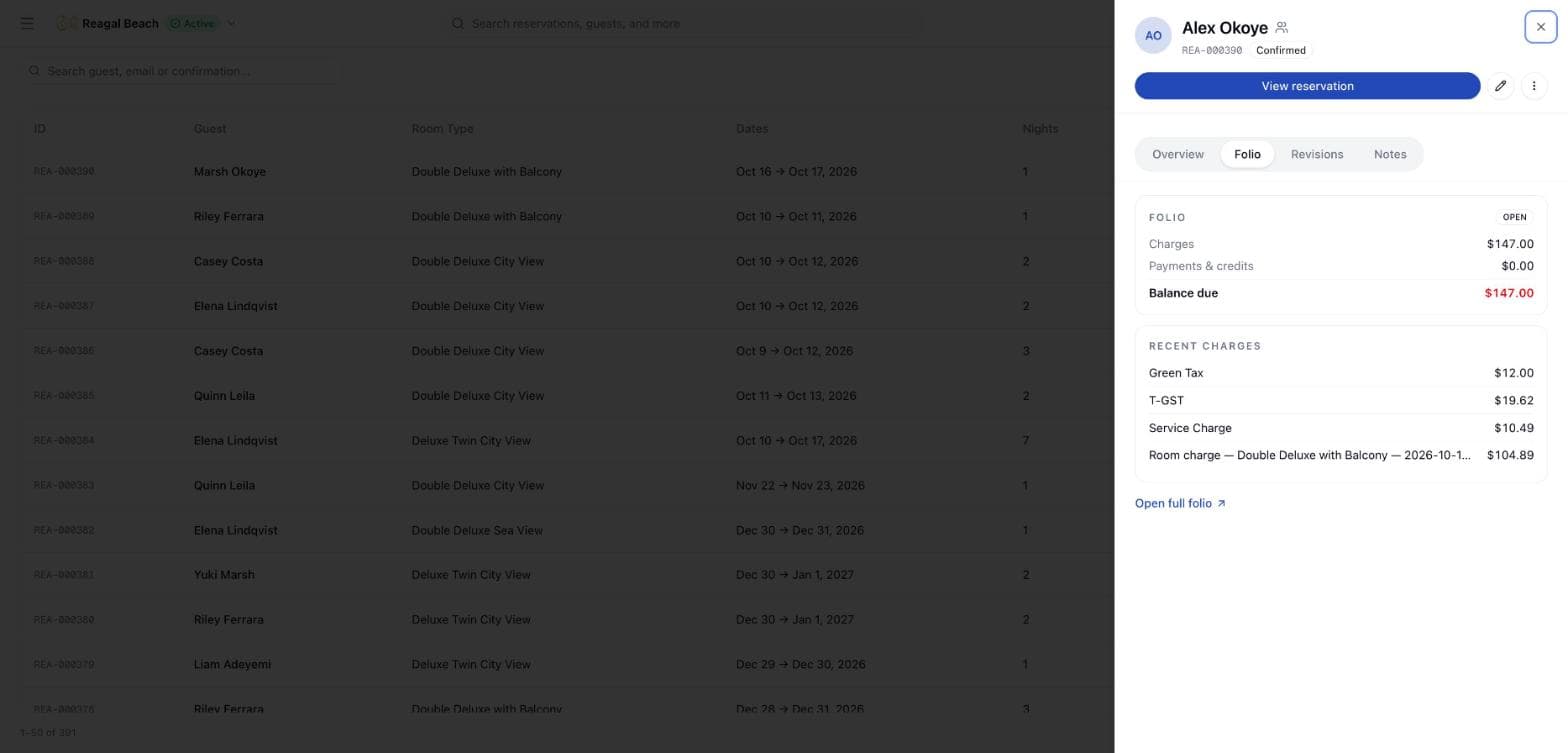
The page has a header, a row of pill tabs and one panel below them. A lighter version of the same information — the detail sheet — slides in from the right on the Bookings and Calendar screens and covers the day-to-day: Overview, a mini Folio, Revisions and Notes, plus Room details and Guarantee for channel bookings.
Header
- Guest name and initials avatar, with the status chip next to it (
On Hold,Confirmed,In-House,Checked Out,Cancelled,No Show). While transitions remain, the chip is a menu; see Statuses and Lifecycle. - Booking reference — the property's own number such as
SUN-000123, or the OTA's confirmation code for a channel booking — in monospace with a copy button on hover, then the source badge (PMS, the channel name, orDirect) and "Booked 21 Sep 2026". - Company chip, on a corporate or agent booking: a briefcase, the partner's name and what it is paying — "Blue Horizon Travels · pays room & tax" — linking to that company's account. See Companies & Agents.
- Hold expiry, while the booking is
On Hold: "Releases 12 Oct, 18:00 unless confirmed", in amber. - Email and phone of the booker as clickable, copyable chips.
- Edit (enabled only for
Confirmedreservations) and Actions. - Reservations back link, which returns to the Bookings list.
Tabs
Overview
The scan line for the front desk. A Stay ribbon shows check-in and check-out dates with the night count and rate plan name between them, and Balance due on the right, read live from the folio. Below it, chips for Arrival (the expected arrival hour, or "Not specified"), Guests ("3 (2 adults, 1 child)") and Rooms.
The Booker and party section shows the primary booker with country flag, email and phone, and "Party on this booking" when occupants have been named or the party is larger than one. The Booking ledger leads with Reservation number — or Confirmation code where the channel supplied one — with its own copy button, then Payment ("Prepaid to Booking.com" or "Collected at property"), Method, Source ID, Booked and Updated timestamps.
Accommodations
One card per room, headed "Room 1 of 2" on a multi-room booking. Each card shows the room type and code, the assigned room number (or "Unassigned") with a Change room / Assign room link, the rate plan badge, a check-in → nights → check-out ribbon, Adults and Children chips and the room's Total. A row showing "2 rooms on this booking" and the combined total appears when there is more than one. Edit reservation and the per-card ⋮ menu open the same edit sheet and actions as the header.
Folio
The full folio: line items with Description, Qty, Unit Price and Total, filters by type (Room Charge, Extra Charge, Discount, Tax, Adjustment, Cancellation Fee, No-show Fee, Early Check-in Fee, Late Check-out Fee) and void status, the payments table (Payment, Reference, Amount), and the Add Charge and Record Payment buttons. Void a line with the trash icon. A company-billed stay keeps the partner's share on its own company window. The detail sheet's mini folio links here with "?tab=folio". See Billing & Accounting for posting rules.
Guest Details
A registration-card view in two parts.
The booker. The left list shows the Booker and any named guests; "(2 of 3 named)" flags people counted but not yet named — "2 more guests are counted on this booking without a name. Collect their details at check-in." Selecting the booker shows First Name, Last Name, Email, Phone, Country, ID Document Type, ID Document Number (masked), Date of Birth, Address Line 1/2, City and Postal Code. Edit details saves straight to the guest profile; Print registration card prints the page; Open guest record jumps to /guests/[id].
Guests staying. Below that is the property's guest register for this booking — everyone sleeping in the rooms, not just whoever booked. The heading counts them: "3 of 4 named · 1 still to add — taxes are charged in full for anyone not yet named · 1 exempt from Green Tax". Add guest adds a row; each row takes Given name, Family name, Nationality, Date of birth, a resident-permit switch, and, on a multi-room booking, a Stays in select naming which room that person sleeps in. Rows that came from the channel are badged "From channel". Save the list as a whole with Save guests — saving re-prices the stay and posts one folio adjustment, which is why the register is edited together rather than row by row.
Each saved row takes ID copy attachments — "No copy attached yet. A photo of the passport page is enough." — with a document type, and the copies stay attached to that person. A row has to be saved before it can hold one. Where you can view but not change the register, the panel says "You can view but not change ID copies."
Coming soon
Take photo and Upload for the booker's own guest photo are present but disabled: "Guest photos aren't supported by the guest API yet." ID copies on the register above are a different thing and do work.
Notes
Shows "Notes (2)" in the tab when notes exist. Two cards: Special requests (guest-facing) and Internal note (staff-only). Add note / Edit note open the note dialog; both are disabled once the reservation is no longer Confirmed.
Detail-sheet-only tabs
The slide-in sheet also has Revisions — the booking's identifiers (Booked via, OTA reference, Channex booking id, Channex unique id, Last revision applied), Created, Last updated, Cancelled timestamps and a History timeline of audit entries with View details to expand field-level changes — and, for channel bookings only, Room details (the OTA's per-room payload: nightly breakdown, taxes, services) and Guarantee (card type, holder, last four digits, expiry, virtual-card flag).
Where is the activity log on the page?
The full page does not have a Revisions or Activity tab. Open the detail sheet from Bookings or the Calendar for the history timeline, or use Settings → Logs filtered by the reservation.
Actions menu
Actions opens a popover in three groups:
| Group | Item | Available when |
|---|---|---|
| Add to reservation | Note | Confirmed |
| Accommodation | Move | Unassigns the room when one is assigned and the guest is not in-house; otherwise shows "Assign a room by dragging this stay on the chart." or "Check the guest out before moving rooms." |
| Reservation | Edit reservation | Confirmed |
| Confirm Booking | On Hold | |
| Release Hold | On Hold | |
| Check In | Confirmed, on the arrival day in the property's timezone | |
| No Show | Confirmed | |
| Cancel | Confirmed | |
| Check Out | In-House |
Check In shows why it is unavailable in the menu itself: "Check-in opens on the arrival day (Sep 22, 2026)." or "Arrival day (Sep 20, 2026) has passed — amend the dates before checking in." It then opens the three-step check-in dialog. Cancel, No Show and Release Hold confirm first; Check Out opens the settlement dialog. Details in Statuses and Lifecycle.
Tips
- Deep-link to the folio with
/reservations/[id]?tab=folio; the mini folio in the sheet does exactly this. - Balance due on Overview is the folio balance, not the reservation total; they differ once payments or extras are posted.
- Read the reference out, not the id. The booking reference in the header is what the guest, the OTA and your own reports use, and it copies with one click.
- Name the register before check-out. Unnamed occupants are taxed in full, so Green Tax exemptions only come off once the people are on the list.
Related
Modifying Reservations
Change rate plan, occupancy, guest details and notes in the edit sheet; move dates and rooms from the Calendar; what is locked after check-in.
Multi-room Reservations
Book several rooms on one reservation, how each room is priced and taxed, how rooms are moved and assigned one at a time, and what cannot be changed afterwards.