

Multi-room Reservations
Book several rooms on one reservation, how each room is priced and taxed, how rooms are moved and assigned one at a time, and what cannot be changed afterwards.
A reservation in Innvera is one booker with one or more rooms. Each room has its own room type, rate plan, assigned room, dates, adult and child counts and amount. A single-room booking has exactly one; a family taking a Deluxe King and a Twin, a group's rooming-list pick-up, or a split stay where the guest changes room type mid-way, has several. The reservation as a whole carries the booker, the source, the status, the notes and one folio.
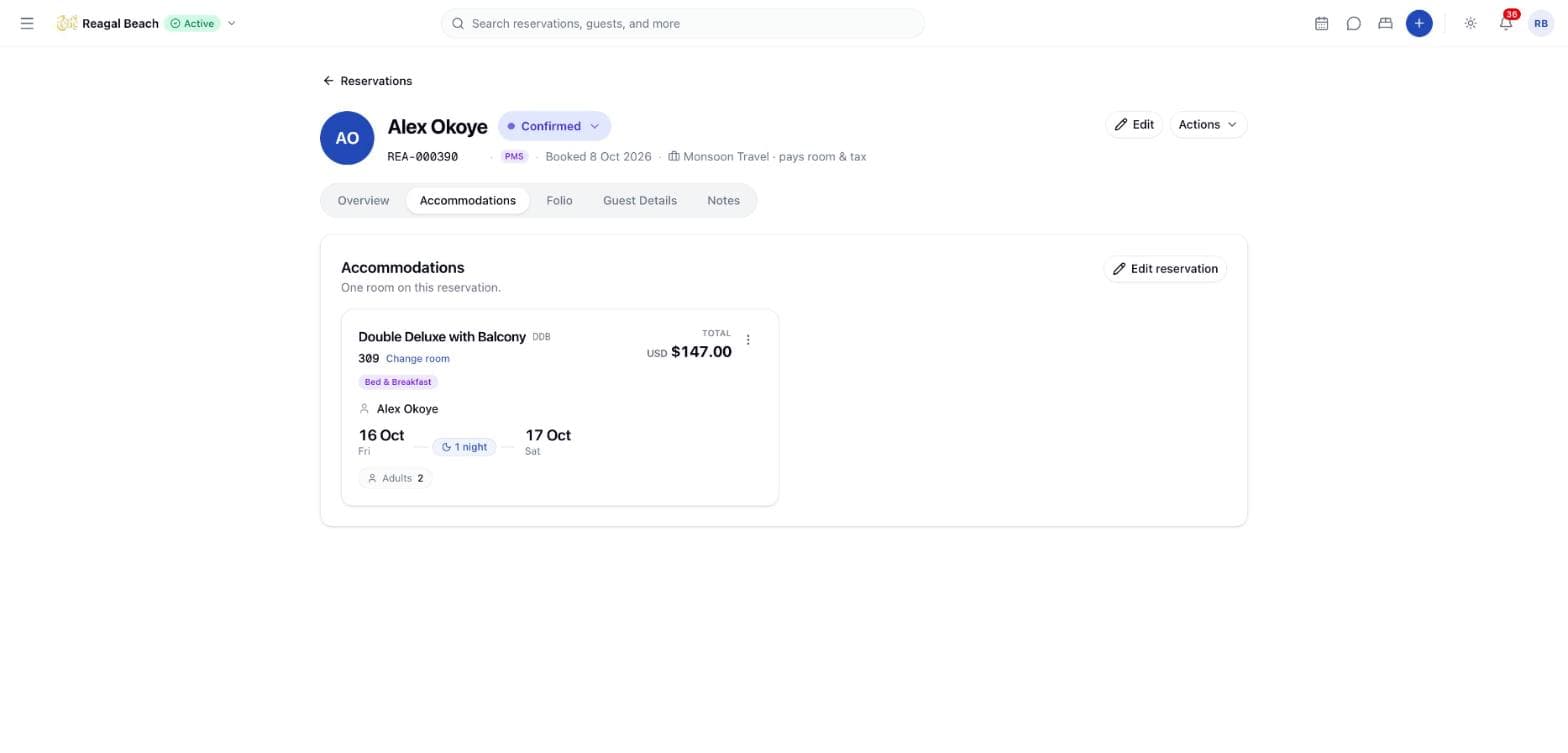
This model is what lets the Calendar draw one bar per room, the Accommodations tab show one card per room, and a room move affect only the room it was meant for.
Where multi-room bookings come from
| Source | How the rooms arrive |
|---|---|
| PMS (staff) | The Rooms editor in the New Reservation sheet — one row per room, each with its own room type, rate plan, adults and children. See Creating Reservations. |
| Group rooming list | Each pick-up off a group block becomes its own reservation, priced at the group's agreed rate. See Group Bookings. |
| Channel (Channex) | An OTA booking for N rooms imports as N rooms, each with the dates, occupancy, rate and nightly breakdown the channel sent. Staggered dates (one room staying longer) are preserved. |
| Direct (booking engine) | Priced per rate plan and room; see the booking engine documentation. |
Book several rooms
Set the stay dates once
The dates belong to the booking: every room arrives and departs together. A stay where one room needs different nights is two bookings, or a channel import that already came in that shape.
Add a row per room
In Rooms, click Add room for each additional room and fill in its Room Type, Rate Plan, Adults and Children. Rows need not match — "Types and rate plans can differ; each room is priced on its own occupancy." Occupancy is capped per row by that row's own room type.
Create
Every row is assigned a real room before anything is saved — a free room of that row's type for the whole stay, never one already given to another row of the same booking. If even one row cannot be housed, the whole booking is refused with "No physical room is available for 2 room(s) of the requested room type(s) for the requested stay". A room you swept on the Calendar is kept for the first row as long as it still has that room type.
How a multi-room booking is priced
Per room, from its own occupancy. Each room takes the rate plan option that matches its own adult count, times the nights, plus the plan's children fee per child per night. Two adults in one room and one in the other book the double and the single rate, not two doubles.
Taxes per (room type, rate plan) group. The tax set belongs to the rate plan, so rooms are grouped by their room type and plan and each group's taxes are worked out over that group's combined base: a per-booking tax is charged once, a per-room tax once per room, and percentage levels compound over the group's base. Lines for the same tax across groups merge into one folio line.
On the folio. One Room Charge line per room, so the ledger shows what each room type was billed, and one Tax line per tax. The reservation total is the sum of the rooms. Where the rooms of a channel booking were created by the importer, the amounts are the channel's.
How it behaves day to day
Accommodations tab. Each room is a card headed "Room 1 of 2" with its own assignment, rate plan badge, occupancy chips and Total, and a row at the bottom shows "2 rooms on this booking" with the combined total. The reservation's headline dates span the earliest check-in to the latest check-out.
Calendar. One bar per room, each on its own room row, carrying a small "1/2" pill — "Room 1 of 2 on this booking" — so two bars with the same guest name are not read as a duplicate. The bar's tooltip gives the guest, which room of the booking it is, the booking reference and the source. Bookings still shows the booking as one row.
Assigning and changing a room. Change room (or Assign room) opens with a Which room select listing "Room 1 of 2 · 204 · Deluxe King" and so on: "Each room is assigned separately. Changing dates moves the whole booking." On the Calendar, drag the individual bar. A room's own sibling still blocks it — dragging one room onto the room its sibling occupies is a genuine conflict.
Changing dates. A date-only drag shifts the whole stay: every room slides by the same number of nights, so staggered stays keep their shape. A drag that changes the room or the room type applies to that one room only. The server processes the rooms one by one through the normal move checks, releasing and taking inventory for each.
The guest register. The Guests staying register on the Guest Details tab gains a Stays in select on a multi-room booking, so each named occupant is attached to the room they sleep in. It reads "3 of 4 named · 1 still to add — taxes are charged in full for anyone not yet named".
Check-in, check-out, cancel, no-show, confirm. These are reservation-level. Check-in marks every assigned room occupied; check-out vacates and dirties every room and raises a departure clean for each; cancel, no-show and releasing a hold give back every room's inventory.
What you cannot change afterwards
The room count is fixed once the booking exists
There is no way to add a room to a saved reservation or to take one off it. Book the right number of rooms up front; if the party changes, create a second reservation for the extra room, or cancel and re-book. Only a channel revision can change the shape of a booking after the fact, and that comes from the OTA.
The edit sheet changes one room at a time, and it does not yet offer a choice of which: on a booking with several rooms, saving a rate-plan or occupancy change there is refused with "This reservation has several room segments — specify reservationRoomId to choose which one to change". Change the room itself (type, room, rate plan) from the Calendar or Change room instead, which are per-room by design.
Group bookings
A block of rooms held for one piece of business — a wedding, a conference, a tour series — is not a multi-room reservation but a group booking, with its own reference (SUN-G-000012), its own block of inventory, an agreed group rate and a rooming list that turns names into individual reservations. It lives in its own section: see Group Bookings and Companies & Agents.
Tips
- Look at the bars, not the row. A multi-room booking is several bars on the Calendar and one row in Bookings.
- Name everyone. Until the register is complete, every tax is charged for the full occupancy — and in the Maldives that is what makes Green Tax exemptions work.
- Watch the Revisions tab on channel bookings: an OTA revision that adds or removes a room appears in the history with a "Changes the stay itself" banner.
Related
Reservation Details
The reservation page at /reservations/[id] — header, status chip, the Overview, Accommodations, Folio, Guest Details and Notes tabs, and the Actions menu.
Statuses and Lifecycle
The six reservation statuses, which transitions are allowed and by whom, and what each one does to rooms, the folio, housekeeping, notifications and channels.